

spssdissertationhelp.com provides Excel Data Analysis services for students, researchers, dissertation writers, business students, professionals, and academic clients who need support cleaning, organizing, analyzing, visualizing, and interpreting data in Microsoft Excel.
Many students and researchers already have their data in Excel, but they are not always sure how to prepare it correctly or turn it into meaningful results. You may have survey responses, business data, financial data, questionnaire results, experimental data, or dissertation data, but still feel unsure about how to clean the spreadsheet, organize variables, use formulas, create pivot tables, run descriptive statistics, perform regression analysis, build charts, use the Excel Analysis ToolPak, or explain the results in academic language.
Our Excel Data Analysis service is designed to help you move from raw spreadsheet data to clear, organized, and interpretable results. Whether you need Excel statistical analysis, Excel data cleaning, Excel regression analysis, Excel pivot tables, Excel charts and graphs, Excel dashboards, survey data analysis, dissertation results support, or business data analysis, we can help you understand what your data shows and how to present it clearly.
When You Need Excel Data Analysis Services
You may need Excel Data Analysis services when you have a spreadsheet but do not know how to organize, analyze, summarize, or explain the data. This is common for dissertation students, Master’s students, MBA students, PhD students, business students, researchers, and professionals who are working with Excel files but need clearer results.
Excel is familiar and accessible, but analysis can become confusing when the dataset has missing values, duplicates, inconsistent labels, mixed text and numbers, poorly formatted columns, unclear variables, or multiple sheets. Statistical analysis in Excel can also be difficult when you need regression, correlation, t-tests, ANOVA, chi-square analysis, pivot tables, charts, or dashboard summaries.
| Client Problem | What It Usually Means | How Excel Data Analysis Helps |
|---|---|---|
| You have an Excel dataset but do not know how to analyze it | The data needs structure, cleaning, and a clear analysis plan | We help organize the data and choose suitable Excel analysis methods |
| Your data is messy, duplicated, incomplete, or poorly formatted | The spreadsheet may produce inaccurate results | We clean, format, validate, and prepare the file for analysis |
| You need descriptive statistics but do not know how to report them | The dataset needs summary tables and clear explanation | We calculate and interpret means, percentages, frequencies, and standard deviations |
| You need charts, graphs, or tables for a dissertation or report | The results need visual presentation | We create clean Excel charts, summary tables, and report-ready visuals |
| You need regression, correlation, t-tests, ANOVA, or chi-square analysis | Your project requires statistical testing | We run suitable Excel statistical analysis and explain the output |
| You need help using Excel Analysis ToolPak | Excel’s built-in analysis tools may be confusing | We use the Excel Analysis ToolPak where appropriate and interpret the results |
| You need pivot tables or dashboards | The data needs interactive summaries | We create pivot tables, slicers, charts, and dashboard-style summaries |
| You need help interpreting Excel output | Raw output is not enough for academic or business reporting | We explain the results in clear academic or professional language |
| You have a deadline | The work needs to be organized quickly and carefully | We help prioritize the required analysis and deliverables |
Excel Data Analysis support is useful when you need more than a spreadsheet. You need clean data, correct calculations, meaningful tables, accurate charts, and clear interpretation. That is where spssdissertationhelp.com can help.
What Is Excel Data Analysis?
Excel Data Analysis is the process of using Microsoft Excel to clean, organize, summarize, analyze, visualize, and interpret data. It can include data cleaning, formulas, functions, pivot tables, descriptive statistics, inferential statistics, regression analysis, correlation analysis, charts, dashboards, survey analysis, business analysis, financial analysis, and academic results reporting.
Excel is widely used because it is accessible, flexible, familiar, and practical for many student, academic, and business projects. It can handle simple summaries, structured tables, charts, formulas, statistical tests, and dashboard-style reports. For many dissertations, assignments, business reports, and research projects, Excel can be enough when the analysis is properly planned and interpreted.
| Excel Data Analysis Area | What It Includes | Why It Matters |
|---|---|---|
| Data cleaning | Removing duplicates, correcting errors, handling missing values, and formatting data | Clean data improves accuracy |
| Data formatting | Organizing columns, labels, dates, numbers, and categories | Proper structure makes analysis easier |
| Formulas and functions | IF, XLOOKUP, VLOOKUP, INDEX MATCH, SUMIF, COUNTIF, and calculated fields | Formulas automate calculations and reduce manual work |
| Pivot tables | Summaries, grouped variables, filters, slicers, and cross-tabulations | Pivot tables help summarize large datasets quickly |
| Descriptive statistics | Mean, median, mode, standard deviation, minimum, maximum, and percentages | Descriptive statistics explain the basic features of the data |
| Statistical tests | t-tests, ANOVA, chi-square, correlation, and regression | Statistical tests help answer research questions |
| Regression analysis | Simple regression, multiple regression, trend analysis, and model interpretation | Regression helps examine prediction and relationships |
| Correlation analysis | Pearson correlation, correlation matrices, and scatterplots | Correlation helps examine relationships between variables |
| Charts and graphs | Bar charts, line charts, pie charts, scatterplots, histograms, and trend charts | Visuals make results easier to understand |
| Dashboards | KPI summaries, slicers, pivot charts, filters, and executive summaries | Dashboards help present data clearly |
| Survey data analysis | Coding responses, Likert scale summaries, frequency tables, and cross-tabulations | Survey analysis helps explain participant responses |
| Academic results reporting | Tables, figures, interpretation, and results wording | Clear reporting supports dissertations and research papers |
Excel Data Analysis is not only about creating formulas or charts. The real value comes from understanding what the data means, choosing the correct method, presenting the results clearly, and explaining the findings in a way that fits your academic or professional purpose.
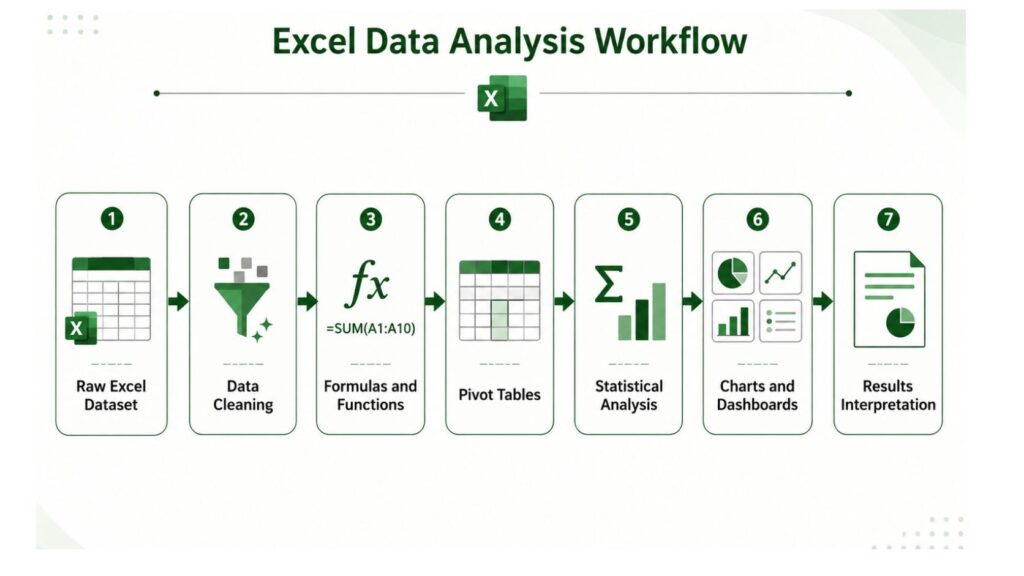
A strong Excel Data Analysis project follows a clear workflow. The process usually begins with raw spreadsheet data, then moves through cleaning, formatting, formulas, pivot tables, statistical analysis, visualization, and final interpretation. This workflow helps ensure that the final results are organized, accurate, and ready for academic or business use.
Our Excel Data Analysis Services
spssdissertationhelp.com provides Excel Data Analysis services for academic, dissertation, research, assignment, business, and professional projects. Our support can include data cleaning, spreadsheet formatting, formulas, pivot tables, descriptive statistics, statistical analysis, regression analysis, charts, dashboards, survey analysis, business reporting, and results interpretation.
| Service Area | What We Help With | Client Outcome |
|---|---|---|
| Excel data cleaning and preparation | Missing values, duplicates, formatting, coding, and validation | A cleaner dataset ready for analysis |
| Excel formulas and functions | Lookup formulas, logical formulas, summary formulas, and calculated fields | More accurate and efficient spreadsheet calculations |
| Excel descriptive statistics | Means, medians, frequencies, percentages, and standard deviations | Clear summary of the data |
| Excel statistical analysis | t-tests, ANOVA, chi-square, correlation, regression, and hypothesis testing | Statistical results that support research questions |
| Excel regression analysis | Simple regression, multiple regression, coefficients, R-squared, and p-values | Clear model-based findings |
| Excel correlation analysis | Pearson correlation, correlation matrices, and scatterplots | Clear explanation of variable relationships |
| Excel Analysis ToolPak | Descriptive statistics, regression, ANOVA, correlation, and covariance | Proper use of Excel’s statistical tools |
| Excel pivot tables | Summaries, grouping, filters, slicers, and cross-tabulations | Organized data summaries |
| Excel charts and visualization | Bar charts, line charts, pie charts, histograms, scatterplots, and trend charts | Clear visual presentation |
| Excel dashboards | KPI summaries, pivot charts, slicers, filters, and executive views | Decision-ready dashboards |
| Excel survey data analysis | Likert scales, demographic tables, frequencies, and cross-tabs | Clear survey findings |
| Excel dissertation data analysis | Chapter 4 support, hypothesis testing, tables, and academic interpretation | Better dissertation results presentation |
| Excel business and financial analysis | Sales, revenue, costs, trends, KPIs, and forecasting support | Better business reporting |
| Excel results interpretation | Output, tables, charts, regression results, and dashboard findings | Clear explanation of results |
Excel Data Cleaning and Preparation
Excel Data Analysis begins with clean and organized data. If your spreadsheet contains missing values, duplicate records, inconsistent labels, mixed formats, merged cells, incorrect dates, blank rows, or poorly named variables, the final results may be inaccurate or confusing.
We help prepare your Excel dataset by cleaning the spreadsheet, organizing columns, correcting formatting problems, identifying duplicates, reviewing missing values, coding responses, creating variables, applying data validation, and structuring the file for analysis. Clean data is especially important for dissertation analysis, survey analysis, regression analysis, financial analysis, and dashboard reporting.
Excel Formulas and Functions for Data Analysis
Excel formulas help automate calculations and organize information. Many projects require formulas such as IF statements, VLOOKUP, XLOOKUP, INDEX MATCH, SUMIF, COUNTIF, AVERAGEIF, text functions, date functions, logical formulas, and calculated fields.
We help create and review formulas so your spreadsheet performs the correct calculations. This can be useful for academic assignments, business reports, survey scoring, financial summaries, KPI tracking, and research data preparation. The goal is to make your Excel file easier to understand, more accurate, and more useful.
Excel Descriptive Statistics
Descriptive statistics summarize the main features of your dataset. In Excel, this may include means, medians, modes, standard deviations, percentages, frequencies, minimum values, maximum values, ranges, and summary tables.
For dissertation and thesis students, descriptive statistics are often needed in the results chapter to describe the sample, summarize variables, and introduce the findings before deeper analysis. For business clients, descriptive statistics help summarize sales, revenue, customer behavior, employee data, costs, or performance metrics.
Excel Statistical Analysis
Excel can be used for many common statistical tests, including t-tests, ANOVA, chi-square analysis, correlation, regression, hypothesis testing, confidence intervals, and p-value interpretation. These analyses can be useful for academic projects, research papers, business reports, and professional data analysis.
We help choose suitable Excel statistical analysis methods based on your research questions, variables, and project instructions. We also help explain the results so you understand what the numbers mean and how they connect to your topic.
Excel Regression Analysis
Excel regression analysis is useful when you want to examine whether one or more independent variables predict an outcome. This may include simple linear regression, multiple regression, trend analysis, coefficient interpretation, R-squared interpretation, p-value interpretation, confidence intervals, residuals, and model explanation.
Regression analysis in Excel is commonly used in business, finance, economics, marketing, education, public health, social science, and dissertation research. We help run and interpret regression results so the findings are not just raw output but meaningful conclusions.
Excel Correlation Analysis
Correlation analysis helps examine whether two continuous variables are related. In Excel, this may include Pearson correlation, correlation matrices, scatterplots, and relationship interpretation.
We help clients interpret the strength, direction, and meaning of correlations. For academic work, this includes explaining whether the relationship is positive or negative, whether it is statistically meaningful, and how it relates to the research questions or hypotheses.
Excel Analysis ToolPak
The Excel Analysis ToolPak is a built-in Excel add-in that can perform statistical tasks such as descriptive statistics, regression, ANOVA, correlation, covariance, moving averages, and other analysis procedures.
Many students and professionals know the ToolPak exists but are not sure how to enable it, use it correctly, or interpret the output. We can help with Excel Analysis ToolPak analysis and explanation so the results can be used properly in academic or business reports.
Excel Pivot Tables
Pivot tables are one of the most powerful tools in Excel Data Analysis. They can summarize large datasets, group categories, filter data, compare variables, create cross-tabulations, and prepare dashboard-ready summaries.
We help create pivot tables, slicers, filters, grouped variables, summary tables, and pivot charts. Pivot tables are useful for survey results, sales reports, marketing analysis, HR data, financial summaries, customer analysis, and dissertation data summaries.
Excel Charts and Data Visualization
Charts and graphs help make results easier to understand. Excel can create bar charts, line charts, pie charts, scatterplots, histograms, trend charts, and other visuals that support academic and business reporting.
We help create clean Excel charts and data visualizations that match your project. For academic work, this may include report-ready figures for dissertations, theses, or research papers. For business work, this may include charts for presentations, dashboards, and executive summaries.
Excel Dashboards
Excel dashboards help combine charts, tables, slicers, filters, and KPI summaries into one visual report. Dashboards are useful when you need to present important data quickly and clearly.
We help build Excel dashboards for business reporting, academic summaries, survey analysis, KPI tracking, sales analysis, financial analysis, operations reporting, and executive presentations. A good dashboard should make the data easier to understand, not more confusing.
Excel Survey Data Analysis
Excel is often used to analyze survey data because many survey platforms export responses into spreadsheet format. Survey data may require coding, cleaning, Likert scale analysis, demographic tables, frequency tables, cross-tabulations, charts, and interpretation.
We help organize and analyze survey data in Excel so results are easier to report. This is useful for dissertations, theses, capstone projects, public health studies, education research, psychology projects, business research, and customer feedback analysis.
Excel Dissertation and Thesis Data Analysis
Many students use Excel for dissertation and thesis analysis because it is accessible and familiar. Excel can support descriptive statistics, charts, correlation, regression, survey analysis, tables, and results reporting when the project does not require more advanced statistical software.
Our Excel Data Analysis service can support research questions, hypotheses, variable coding, data cleaning, descriptive statistics, statistical tests, Excel Analysis ToolPak results, charts, tables, Chapter 4 results, academic interpretation, and supervisor feedback revisions.
Excel Business and Financial Data Analysis
Excel is widely used for business and financial analysis. Professionals often need support with sales analysis, revenue analysis, cost analysis, financial summaries, trend analysis, forecasting support, KPI dashboards, and business reporting.
We help turn spreadsheet data into clearer insights through formulas, pivot tables, charts, dashboards, and summaries. This support can be useful for managers, business students, MBA students, entrepreneurs, analysts, and professionals preparing reports.
Excel Results Interpretation
Excel output is only useful when it is explained clearly. Many clients can create charts or run a regression but still struggle to interpret what the results mean.
We help interpret Excel output, charts, regression results, correlation tables, descriptive statistics, pivot tables, dashboards, and statistical findings. For academic projects, we can help explain results in a clear research-focused style. For business projects, we can help summarize insights in a practical decision-making format.
Types of Excel Data Analysis We Support
Excel can support many types of analysis depending on the dataset, project instructions, and required deliverables. The right approach depends on what you need to find out from the data.
| Analysis Need | Excel Method | Example Use |
|---|---|---|
| Summarize data | Descriptive statistics | Mean, median, standard deviation, percentages |
| Compare two groups | t-test | Compare average scores between two groups |
| Compare multiple groups | ANOVA | Compare outcomes across categories |
| Test association | Chi-square | Test relationship between categorical variables |
| Measure relationship | Correlation | Examine relationship between continuous variables |
| Predict an outcome | Regression | Predict sales, scores, performance, or research outcomes |
| Summarize categories | Pivot tables | Analyze responses by group |
| Show trends | Line charts and trendlines | Analyze changes over time |
| Build dashboards | Charts, slicers, and pivot tables | Create visual summaries |
| Analyze survey responses | Frequencies and cross-tabulations | Present survey findings |
Excel Data Analysis can be simple or detailed. A small project may only need descriptive statistics and charts, while a larger project may require data cleaning, formulas, pivot tables, regression analysis, dashboard creation, and written interpretation.
Excel Data Analysis for Dissertations, Theses, and Research
Excel Data Analysis is commonly used in dissertations, theses, research papers, capstone projects, and academic assignments. Many students collect data using surveys, questionnaires, experiments, business records, public datasets, or secondary research sources, and the data is often stored in Excel.
Our service can support research questions, hypotheses, variable coding, data cleaning, descriptive statistics, statistical tests, Excel Analysis ToolPak, charts and tables, Chapter 4 results, academic interpretation, and supervisor feedback revisions. The goal is to help you understand your data and present your findings in a clear academic format.
For students whose projects require more specialized statistical software, spssdissertationhelp.com may also support related work such as SPSS dissertation help, dissertation data analysis support, and Stata statistical analysis, where available.
Excel Data Analysis for Business and Professional Projects
Excel Data Analysis is also useful for business owners, managers, analysts, professionals, and organizations that need clean spreadsheets, sales reports, financial summaries, KPI tracking, dashboards, charts, and decision-ready data.
Business Excel Data Analysis may include sales analysis, revenue analysis, customer data analysis, marketing campaign analysis, finance and accounting analysis, HR data analysis, operations reports, KPI dashboards, forecasting support, and executive summaries. Excel is often the first tool businesses use because it is flexible, widely available, and easy to share.
A well-built Excel analysis file can help your team understand performance, identify trends, compare categories, monitor KPIs, and present results clearly.
Our Excel Data Analysis Process
Our Excel Data Analysis process is designed to help clients understand what was done, why it was done, and how the results should be explained.
| Step | What Happens | What You Receive |
|---|---|---|
| 1. Project review | We review your topic, instructions, deadline, and required deliverables | Clear understanding of the project scope |
| 2. Research question and instruction review | We review research questions, hypotheses, or business objectives | Better alignment between analysis and goals |
| 3. Excel dataset review | We examine the spreadsheet structure, sheets, variables, and formatting | Dataset readiness review |
| 4. Data cleaning and formatting | We clean, organize, code, and format the data | Cleaner Excel dataset |
| 5. Formula, pivot table, or statistical method selection | We identify the right Excel methods for your project | Clear analysis plan |
| 6. Excel data analysis | We run the analysis using formulas, ToolPak, pivot tables, charts, or dashboards | Excel results and outputs |
| 7. Chart, table, or dashboard creation | We create report-ready summaries and visuals | Clear presentation of findings |
| 8. Results interpretation | We explain the findings in academic or business language | Interpretation notes |
| 9. Academic or business reporting support | We help organize results for your report, dissertation, or presentation | Better reporting structure |
| 10. Revisions and clarification | We address reasonable clarification needs based on scope | Better final understanding |
The process starts with reviewing your dataset and project instructions. From there, we clean the file, choose the right analysis method, run the analysis, create the required tables or charts, and help interpret the results.
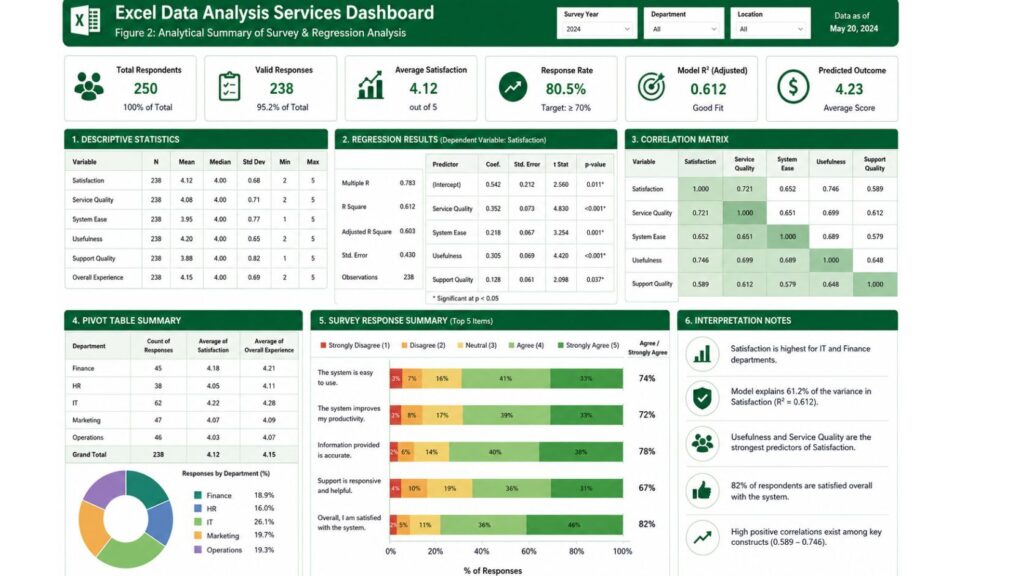
Excel Data Analysis can also include dashboards and visual summaries that make results easier to understand. Instead of leaving clients with raw spreadsheet output, a dashboard can organize key findings into charts, tables, KPI cards, pivot summaries, and interpretation notes. This is especially useful for dissertations, business reports, survey projects, and executive presentations.
What You Receive From Our Excel Data Analysis Service
Deliverables depend on the project scope, deadline, dataset size, and required analysis. A simple project may only require a cleaned spreadsheet and summary statistics, while a larger project may require formulas, pivot tables, regression output, charts, dashboards, and written interpretation.
| Deliverable | Purpose |
|---|---|
| Cleaned Excel dataset | Provides a more accurate file for analysis |
| Formatted spreadsheet | Makes the file easier to read and use |
| Excel formulas | Automates calculations and analysis steps |
| Pivot tables | Summarizes data by categories and groups |
| Descriptive statistics tables | Explains the basic features of the data |
| Regression output | Shows prediction or relationship results |
| Correlation tables | Shows relationships between variables |
| Charts and graphs | Provides visual presentation of findings |
| Excel dashboard | Creates an interactive or summary view |
| Interpretation notes | Explains what the results mean |
| Academic results wording | Supports dissertation or thesis reporting |
| Business report summary | Supports professional decision-making |
| Revision support | Helps address reasonable clarification or feedback |
The final deliverables may include a cleaned Excel file, formatted dataset, formulas, pivot tables, descriptive statistics, regression output, correlation tables, charts, dashboard summaries, interpretation notes, academic results wording, business report summaries, and revision support where applicable.
Excel Data Analysis Pricing
Excel Data Analysis pricing depends on dataset size, number of variables, data cleaning needs, number of charts or tables, statistical test complexity, dashboard requirements, pivot table requirements, formula complexity, deadline urgency, academic writing support, and revision needs.
| Package | Best For | Suggested Starting Price | Includes |
|---|---|---|---|
| Basic Excel Data Analysis | Small datasets or simple summaries | From $60–$120 | Data review, basic cleaning, summary tables, and simple charts |
| Excel Statistical Analysis | t-tests, ANOVA, correlation, regression | From $120–$300 | Statistical output, basic interpretation, and results summary |
| Excel Dissertation Data Analysis | Dissertation or thesis projects | From $250–$600+ | Data cleaning, statistical analysis, charts, tables, and academic interpretation |
| Excel Dashboard or Pivot Table Project | Dashboards, charts, slicers, and summaries | From $200–$700+ | Pivot tables, dashboard layout, charts, slicers, and KPI summaries |
| Advanced Excel Data Analysis | Large datasets, complex formulas, multiple outputs | From $500–$1,000+ | Advanced formulas, multiple analyses, dashboard or report support |
| Urgent Excel Data Analysis | Short deadlines | Custom quote | Priority support based on project scope and availability |
These are general starting ranges. Final pricing depends on your dataset, deadline, project instructions, number of required outputs, academic or business requirements, and the level of interpretation needed.
Excel Data Analysis for Different Academic and Business Fields
Excel is used across many fields because it is flexible and widely available. The type of analysis needed often depends on the subject area and project goals.
| Field | Common Excel Data Analysis Need |
|---|---|
| Business and management | Sales reports, customer data, KPIs, survey analysis, and dashboards |
| Finance | Revenue analysis, cost summaries, trend analysis, and financial models |
| Accounting | Expense summaries, reconciliations, variance analysis, and financial tables |
| Marketing | Campaign analysis, customer segmentation, survey results, and charts |
| Public health | Survey data, demographic summaries, health outcome tables, and charts |
| Nursing | Patient data summaries, survey responses, and intervention outcomes |
| Education | Student performance, program evaluation, and group comparisons |
| Psychology | Survey responses, descriptive statistics, and correlation analysis |
| Social sciences | Questionnaire analysis, demographic tables, and statistical summaries |
| Economics | Trend analysis, regression, and secondary data summaries |
| Human resources | Employee data, satisfaction surveys, performance summaries, and dashboards |
| Operations | Process data, productivity reports, inventory summaries, and KPIs |
| Real estate | Property data, rental trends, revenue summaries, and comparison tables |
| Nonprofit research | Donor data, program evaluation, survey results, and reports |
| MBA and DBA projects | Business reports, dashboards, financial analysis, and applied research |
Whether your project is academic, professional, or business-focused, the analysis should match the data and the purpose of the report.
Excel Data Analysis vs SPSS, Stata, Minitab, Jamovi, and JASP
Excel is useful for spreadsheet-based analysis, charts, formulas, pivot tables, dashboards, and basic statistical work. However, other statistical tools may be better for advanced modeling, specialized statistical procedures, or complex academic analysis.
| Tool | Best For | When Excel May Be Enough | When Another Tool May Be Better |
|---|---|---|---|
| Excel | Spreadsheets, formulas, charts, pivot tables, dashboards, basic statistics | Simple to moderate analysis, summaries, charts, and business reports | Complex statistical modeling or large-scale reproducible analysis |
| SPSS | Social science statistics, survey data, menu-based analysis | Basic summaries and charts before deeper analysis | Detailed statistical tests, scale analysis, and dissertation statistics |
| Stata | Regression, econometrics, panel data, survey commands | Basic tables and spreadsheet preparation | Advanced regression, panel data, econometrics, and reproducible command-based analysis |
| Minitab | Quality improvement, Six Sigma, statistics, process analysis | Basic summaries and charts | Quality control, process capability, and specialized statistical analysis |
| Jamovi | User-friendly academic statistics | Basic summaries and spreadsheet work | Psychology, social science, and academic statistical testing |
| JASP | Bayesian analysis, psychology, academic statistics | Basic dataset organization | Bayesian statistics, advanced tests, and academic statistical modeling |
Excel may be enough when your project requires clean summaries, charts, pivot tables, basic statistical tests, or business dashboards. Another tool may be better when your project requires advanced statistical procedures, complex modeling, or specialized academic methods.
Why Our Excel Data Analysis Service Is Different
Our Excel Data Analysis service is different because it is built for academic, dissertation, research, and business analysis—not just basic spreadsheet editing. Many generic Excel freelancers can clean a file or create a chart, but they may not understand research questions, hypotheses, dissertation results, statistical interpretation, or academic reporting requirements.
spssdissertationhelp.com focuses on helping clients understand their data, not just receive a spreadsheet. We help connect Excel analysis to research questions, reporting requirements, academic interpretation, and practical decision-making. The service can support Excel statistics, dashboards, formulas, pivot tables, regression analysis, data cleaning, and results interpretation in one place.
| Option | Limitation | Why Our Excel Data Analysis Service Is Stronger |
|---|---|---|
| Generic Excel freelancers | May focus only on spreadsheet formatting or formulas | We combine spreadsheet support with academic and research interpretation |
| Excel tutors | May teach concepts but not complete structured analysis deliverables | We focus on project-specific analysis, tables, charts, and interpretation |
| Basic tutorial websites | Provide general instructions but not custom project support | We review your actual dataset and instructions |
| Low-quality assignment sites | May produce unclear or irresponsible work | We position the service as data analysis support and research guidance |
| spssdissertationhelp.com | Built for academic, research, and data analysis support | We support Excel cleaning, statistics, dashboards, interpretation, and responsible reporting |
Common Mistakes in Excel Data Analysis
Excel is powerful, but mistakes are easy to make. Clients often use the wrong formulas, mix text and numeric values, fail to remove duplicates, use inconsistent labels, misuse pivot tables, create misleading charts, misinterpret regression output, ignore missing values, use the wrong statistical test, or present results without explanation.
| Common Mistake | Why It Matters | How We Help |
|---|---|---|
| Using the wrong formulas | Calculations may be inaccurate | We review formulas and create correct calculations |
| Mixing text and numeric values | Excel may not calculate correctly | We clean and format data types properly |
| Ignoring duplicates | Results may be inflated or misleading | We identify and remove duplicate records where appropriate |
| Using inconsistent labels | Categories may be counted incorrectly | We standardize labels and categories |
| Misusing pivot tables | Summaries may not answer the right question | We build pivot tables based on project goals |
| Creating misleading charts | Visuals may confuse readers | We create clean and appropriate charts |
| Misinterpreting regression output | Findings may be explained incorrectly | We help interpret coefficients, p-values, and R-squared |
| Ignoring missing values | Missing data may affect results | We review missing data and discuss how it affects analysis |
| Using the wrong statistical test | Results may not match the research question | We help match the method to the variables and project |
| Presenting results without explanation | Tables alone may not satisfy academic requirements | We help explain results clearly |
Avoiding these mistakes can make your analysis clearer, more accurate, and easier to defend in an academic or business setting.
Why Choose spssdissertationhelp.com for Excel Data Analysis?
spssdissertationhelp.com focuses on academic and research data analysis support. Our Excel Data Analysis service is designed to help students, researchers, and professionals understand their data, organize Excel files, run suitable analysis, create clear tables and charts, interpret results, and present findings in academic or business format.
Clients choose this service because it supports academic and dissertation-focused analysis, Excel analysis for students and researchers, research questions and hypotheses, formulas, pivot tables, charts, dashboards, statistics, clear results interpretation, custom support based on the project, confidential handling of data, revision support where applicable, and a fast quote process.
The goal is not to overwhelm you with technical output. The goal is to help you understand what the data shows and how the results can be presented clearly.
Responsible Excel Data Analysis Support
Our Excel Data Analysis service provides data analysis support, statistical guidance, spreadsheet organization, output interpretation, and research assistance. The service is designed to help students and researchers understand their data, choose suitable analysis methods, interpret Excel results, and present findings responsibly.
We do not guarantee grades, supervisor approval, publication acceptance, or academic outcomes. Clients should use all support responsibly according to their institution’s academic integrity policies. Students remain responsible for understanding their research, reviewing the analysis, and submitting work that follows their university’s requirements.
Frequently Asked Questions About Excel Data Analysis
Excel Data Analysis is the process of using Microsoft Excel to clean, organize, summarize, analyze, visualize, and interpret data. It can include formulas, pivot tables, charts, descriptive statistics, regression, correlation, dashboards, survey analysis, and academic or business reporting.
Yes. spssdissertationhelp.com provides Excel Data Analysis services for dissertations, theses, capstone projects, research papers, assignments, and academic reports. Support can include data cleaning, descriptive statistics, charts, regression, correlation, survey analysis, tables, and results interpretation.
Excel Data Analysis pricing depends on dataset size, number of variables, data cleaning needs, statistical complexity, number of charts or tables, dashboard requirements, deadline, and interpretation needs. Basic projects may start from $60–$120, while dissertation, dashboard, or advanced analysis projects may cost more.
Yes. Excel can be used for many statistical analysis tasks, including descriptive statistics, t-tests, ANOVA, correlation, regression, chi-square analysis, and hypothesis testing. The Excel Analysis ToolPak can also support several statistical procedures.
Yes. You can submit your Excel dataset with your project instructions, research questions, hypotheses, required analysis, and deadline. The dataset can be reviewed to determine the appropriate scope and quote.
Yes. Excel data cleaning can include removing duplicates, correcting formatting, handling missing values, standardizing labels, organizing variables, coding survey responses, and preparing the file for analysis.
Yes. Excel charts and graphs can include bar charts, line charts, pie charts, scatterplots, histograms, trend charts, and report-ready visuals depending on your project needs.
Yes. Pivot tables can be created to summarize data by groups, categories, dates, variables, or response options. Pivot tables can also support dashboards, slicers, filters, and cross-tabulations.
Yes. Excel Analysis ToolPak can be used for descriptive statistics, regression, ANOVA, correlation, covariance, moving averages, and other statistical procedures where appropriate.
Yes. Excel regression analysis can be used to examine relationships between variables and predict an outcome. Support can include simple linear regression, multiple regression, coefficient interpretation, R-squared interpretation, p-values, confidence intervals, and results explanation.
Yes. Excel regression output interpretation can include explaining coefficients, standard errors, p-values, confidence intervals, R-squared, adjusted R-squared, residuals, and overall model meaning.
Yes. Excel survey data analysis can include coding responses, cleaning survey data, creating frequency tables, analyzing Likert scale responses, building cross-tabulations, creating charts, and interpreting results.
Yes. Excel dashboards can include KPI cards, pivot charts, slicers, filters, trend charts, summary tables, and executive-style visuals for academic or business reporting.
Yes. Excel is widely used for business data analysis, including sales analysis, revenue analysis, cost analysis, customer analysis, marketing analysis, HR data analysis, operations reporting, KPI dashboards, and financial summaries.
Excel may be enough for some dissertation projects, especially those requiring descriptive statistics, charts, survey summaries, correlation, regression, or basic statistical tests. However, more advanced dissertation analysis may require SPSS, Stata, Minitab, Jamovi, JASP, R, or another statistical tool depending on the research design.
You should send your Excel dataset, research topic, research questions, hypotheses, assignment instructions, supervisor feedback, required analysis, formatting requirements, and deadline. Business clients should send the dataset, reporting goals, required outputs, and deadline.
Quote speed depends on project complexity and availability. To receive a faster quote, submit your Excel file, instructions, deadline, and required deliverables clearly.
To request a quote now, send your Excel dataset, project instructions, research questions, required analysis, and deadline through the contact page. The project can then be reviewed and priced based on scope.
Request Quote Now for Excel Data Analysis
If you need Excel Data Analysis for a dissertation, thesis, research paper, assignment, business report, dashboard, survey project, or professional analysis, spssdissertationhelp.com can help you turn your spreadsheet into clear results.
Our Excel Data Analysis service can support data cleaning, descriptive statistics, regression analysis, correlation analysis, pivot tables, charts, dashboards, Excel results interpretation, dissertation and thesis support, business data analysis, and custom reporting.
To begin, submit your Excel dataset, research topic, research questions, supervisor instructions, required analysis, and deadline. You can request a custom quote based on your exact project needs.