How to Run ANCOVA in SPSS
Analysis of covariance, usually called ANCOVA, is one of the most useful procedures in SPSS for researchers who want to compare group means while controlling for the influence of another variable. If you are trying to understand how to run ANCOVA in SPSS, the most important idea is simple: ANCOVA helps you test whether groups differ on an outcome after adjusting for a covariate. This makes it especially valuable in dissertations, theses, healthcare studies, education research, psychology projects, and business research where pre-existing differences may affect the final outcome.
Many students understand ANOVA at a basic level but become confused when a supervisor asks them to control for a continuous variable such as age, baseline score, income, or pre-test performance. That is where ANCOVA becomes the correct method. Instead of only comparing raw group means, ANCOVA adjusts the means by taking the covariate into account. This allows the researcher to make a cleaner comparison between groups.
For spssdissertationhelp, this topic should be treated as distinct from ANOVA in SPSS, Multiple Regression Analysis in SPSS, and MANOVA in SPSS so the content stays focused and avoids keyword cannibalization. This page is specifically about running ANCOVA in SPSS, understanding its assumptions, following the software steps correctly, and interpreting the output in a dissertation-friendly way.
What Is ANCOVA in SPSS?
ANCOVA is a statistical test that combines features of ANOVA and regression. It compares the means of two or more groups on a dependent variable while statistically controlling for one or more continuous covariates. The purpose is to reduce error variation and adjust for variables that might influence the outcome.
For example, imagine a researcher comparing exam performance across three teaching methods. If students already had different baseline knowledge before the teaching method was introduced, pre-test score could be included as a covariate. ANCOVA would then compare the post-test means after adjusting for those baseline differences.
This is why ANCOVA is so valuable in applied research. It helps answer questions such as whether treatment groups differ after accounting for age, whether patient outcomes vary after controlling for baseline severity, or whether educational interventions differ after adjusting for prior performance.
When Should You Use ANCOVA?
ANCOVA is appropriate when your study includes:
- one continuous dependent variable
- one categorical independent variable with two or more groups
- one or more continuous covariates
- a research goal that involves comparing adjusted group means
Common examples include:
- comparing post-test scores across treatment groups while controlling for pre-test scores
- comparing blood pressure outcomes across intervention types while controlling for age
- comparing customer satisfaction across service models while controlling for income or prior usage
- comparing psychological symptom scores across therapy groups while controlling for baseline severity
If your study does not include a covariate, then ANOVA in SPSS may be more appropriate. If you are predicting an outcome using several independent variables rather than focusing on adjusted group comparisons, Regression Analysis in SPSS may be the better fit.
Why Researchers Use ANCOVA
One major benefit of ANCOVA is that it improves fairness in group comparisons. In real-world research, groups are not always perfectly equal at baseline. Even in well-planned studies, participants may differ in age, prior ability, motivation, or other measurable characteristics. ANCOVA helps account for that by adjusting the dependent variable for the effect of the covariate.
Another benefit is that ANCOVA can increase statistical power by reducing unexplained error variance. When the covariate is strongly related to the dependent variable, adjusting for it can make true group differences easier to detect.
That said, ANCOVA is only useful when it is chosen correctly and interpreted properly. Many students run the test in SPSS without checking assumptions, or they confuse adjusted means with raw means. That leads to weak reporting and supervisor corrections.
Assumptions of ANCOVA in SPSS
Before you run ANCOVA in SPSS, check the assumptions carefully. This is one of the most important parts of the analysis because a correct result depends on more than simply clicking the right menu.
1. Continuous dependent variable
The dependent variable should be measured on a continuous scale. Examples include test scores, blood pressure, sales, reaction time, or satisfaction scores treated as scale data.
2. Categorical independent variable
The independent variable should consist of two or more groups. Examples include treatment group, teaching method, department, or therapy type.
3. Continuous covariate
The covariate should be continuous and logically related to the dependent variable. Common examples are age, pre-test score, baseline score, or income.
4. Linear relationship between covariate and dependent variable
The covariate should have a roughly linear relationship with the dependent variable. Scatterplots can help assess this.
5. Homogeneity of regression slopes
This is a key ANCOVA assumption. It means the relationship between the covariate and the dependent variable should be similar across all groups. If the slopes differ sharply by group, standard ANCOVA may not be appropriate.
6. Normality of residuals
The residuals should be approximately normally distributed.
7. Homogeneity of variances
The variance of the dependent variable should be reasonably equal across groups. In SPSS, Levene’s Test helps assess this.
8. Independence of observations
Each participant should contribute one independent observation unless the design specifically accounts for repeated measures.
Data Setup for ANCOVA in SPSS
Your data should be arranged with:
- one column for the dependent variable
- one column for the grouping variable
- one column for the covariate
A simple example looks like this:
| Participant | Teaching_Method | Post_Test | Pre_Test |
|---|---|---|---|
| 1 | Lecture | 72 | 60 |
| 2 | Lecture | 75 | 62 |
| 3 | Online | 80 | 66 |
| 4 | Hybrid | 84 | 70 |
In this example:
- Post_Test is the dependent variable
- Teaching_Method is the independent variable
- Pre_Test is the covariate
Make sure the grouping variable is coded properly and the scale variables are defined correctly in SPSS.
How to Run ANCOVA in SPSS Step by Step
These are the steps the client should follow in SPSS.
Step 1: Open your dataset
Launch SPSS and load the file containing your dependent variable, independent grouping variable, and covariate.
Step 2: Check variable types
In Variable View, confirm that:
- the dependent variable is set as scale
- the covariate is set as scale
- the grouping variable is defined correctly as nominal
Step 3: Go to the ANCOVA procedure
Click Analyze, then General Linear Model, then Univariate.
Step 4: Assign the dependent variable
Move your outcome variable into the Dependent Variable box.
Step 5: Assign the fixed factor
Move your grouping variable into the Fixed Factor(s) box.
Step 6: Assign the covariate
Move your control variable into the Covariate(s) box.
Step 7: Request descriptive statistics and effect sizes
Click Options. Move the grouping variable into the display box. Then check:
- Descriptive statistics
- Estimates of effect size
- Homogeneity tests
- Parameter estimates, if needed
You may also select Compare main effects if you want post hoc pairwise comparisons for the adjusted means.
Step 8: Request estimated marginal means
Still under Options, request estimated marginal means for the grouping variable. These are the adjusted means, and they are often central to ANCOVA interpretation.
Step 9: Check assumptions if needed
If you need to test homogeneity of regression slopes, create an interaction term between the covariate and group variable or include the interaction in the model. If that interaction is significant, the assumption may be violated.
Step 10: Run the analysis
Click OK. SPSS will generate the output.
How to Test Homogeneity of Regression Slopes
This assumption deserves special attention because it is one of the main things that separates ANCOVA from simple ANOVA.
To check it, include the interaction between the covariate and the group variable in the model. If the interaction is not statistically significant, the assumption is usually considered met. If it is significant, it suggests the covariate relates to the dependent variable differently across groups, and the standard ANCOVA model may not be appropriate.
In dissertation reporting, you can write something like:
“The assumption of homogeneity of regression slopes was assessed by testing the interaction between the covariate and group. The interaction was not statistically significant, indicating that the assumption was met.”
Key SPSS Output Tables to Interpret
SPSS often produces several tables. These are the most important ones.
Descriptive Statistics
This table shows raw group means and standard deviations before adjustment. It is helpful for context but does not provide the main ANCOVA conclusion.
Levene’s Test of Equality of Error Variances
This tests homogeneity of variances. A non-significant result suggests the assumption is met.
Tests of Between-Subjects Effects
This is the main ANCOVA table. It shows whether the group variable remains significant after controlling for the covariate. It also shows whether the covariate itself is significant.
Estimated Marginal Means
This table shows the adjusted group means after controlling for the covariate. These means are usually more important than the raw means in ANCOVA interpretation.
Request Quote Now
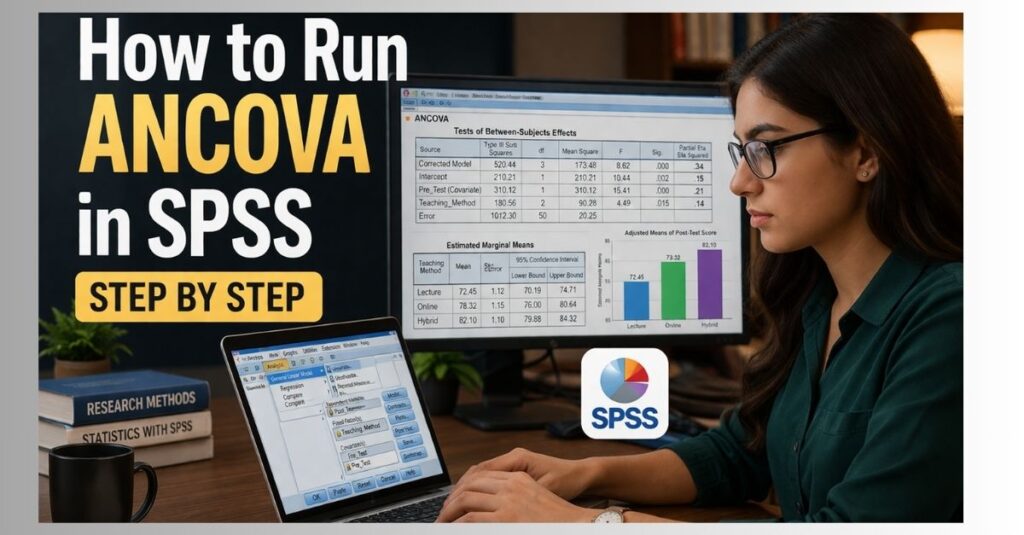
Example of an ANCOVA Output Table
| Source | Type III Sum of Squares | df | Mean Square | F | Sig. | Partial Eta Squared |
|---|---|---|---|---|---|---|
| Corrected Model | 520.44 | 3 | 173.48 | 8.62 | .000 | .34 |
| Intercept | 210.21 | 1 | 210.21 | 10.44 | .002 | .15 |
| Pre_Test | 310.12 | 1 | 310.12 | 15.41 | .000 | .21 |
| Teaching_Method | 180.56 | 2 | 90.28 | 4.49 | .015 | .14 |
| Error | 1012.30 | 50 | 20.25 |
In this example, Teaching_Method is significant at p = .015 after controlling for Pre_Test. That means the groups differ significantly on the post-test even after adjustment for the covariate.
How to Interpret ANCOVA Results
Suppose your dependent variable is post-test score, your group variable is teaching method, and your covariate is pre-test score. If the group effect is significant, the interpretation would focus on adjusted differences, not raw differences.
A clean interpretation could read:
“An ANCOVA was conducted to compare post-test scores across teaching methods while controlling for pre-test scores. After adjusting for the covariate, there was a statistically significant effect of teaching method on post-test scores, F(2, 50) = 4.49, p = .015, partial η² = .14. This indicates that post-test performance differed significantly across groups after controlling for baseline performance.”
If estimated marginal means show Hybrid had the highest adjusted mean, you can then explain which group performed best after adjustment.
How to Report ANCOVA in APA Style
A concise APA-style example is:
“A one-way ANCOVA was conducted to determine whether post-test scores differed by teaching method after controlling for pre-test scores. There was a statistically significant effect of teaching method on post-test scores after controlling for pre-test scores, F(2, 50) = 4.49, p = .015, partial η² = .14.”
If pairwise comparisons are included, add which groups differed significantly.
Common Mistakes to Avoid
Many students lose marks because of avoidable ANCOVA errors. These include:
- using a categorical variable as a covariate without justification
- ignoring homogeneity of regression slopes
- interpreting raw means instead of adjusted means
- failing to report the covariate effect
- confusing ANCOVA with ANOVA
- reporting p = .000 instead of p < .001
- not explaining why the covariate was included
When ANCOVA Is Better Than ANOVA
ANCOVA is better than ANOVA when you need to control for a continuous variable that may influence the outcome. If there is no covariate, ANOVA is usually enough. If there is a meaningful continuous control variable, ANCOVA is more appropriate because it adjusts the group means before comparison.
This distinction is useful for SEO and user intent. Someone searching for how to run ANCOVA in SPSS wants help with adjustment and covariates, not a generic ANOVA guide.
Final Practical Checklist for Clients
Before running ANCOVA in SPSS, the client should confirm all of the following:
- I have one continuous dependent variable
- I have one categorical grouping variable
- I have at least one continuous covariate
- My covariate is related to the dependent variable
- I checked that the regression slopes are reasonably similar across groups
- I requested descriptive statistics, effect sizes, homogeneity tests, and estimated marginal means
- I am interpreting adjusted means, not just raw means
- I know how to report the F value, p-value, degrees of freedom, and partial eta squared
FAQ
What does ANCOVA do in SPSS?
ANCOVA compares group means while statistically controlling for a continuous covariate.
What is the difference between ANOVA and ANCOVA?
ANOVA compares group means directly, while ANCOVA compares adjusted group means after controlling for a covariate.
Can I use more than one covariate in ANCOVA?
Yes, SPSS allows multiple covariates, as long as the model remains appropriate and assumptions are checked.
What is the most important assumption in ANCOVA?
All assumptions matter, but homogeneity of regression slopes is especially important because ANCOVA assumes the covariate works similarly across groups.
Should I interpret raw means or adjusted means?
In ANCOVA, the adjusted means from estimated marginal means are usually more important.
What if the group by covariate interaction is significant?
That may indicate a violation of homogeneity of regression slopes, meaning standard ANCOVA may not be appropriate.
Is ANCOVA suitable for dissertation research?
Yes. ANCOVA is widely used in education, healthcare, psychology, nursing, and business dissertations.
Can spssdissertationhelp help with ANCOVA output?
Yes. We can help with SPSS dissertation help, assumption checking, output interpretation, APA reporting, and results chapter writing.
Closing Paragraph
If you want to learn how to run ANCOVA in SPSS correctly, the key is to think beyond the menu path. A strong ANCOVA analysis requires correct data setup, assumption checking, proper selection of the dependent variable, factor, and covariate, and clear interpretation of the adjusted group differences. When explained well, ANCOVA can strengthen a dissertation by showing that group comparisons remain meaningful even after important baseline differences are controlled. For students and researchers who need accurate support, this topic fits naturally within the wider services offered by spssdissertationhelp.