SPSS vs Stata: Which Statistical Software Should You Use for Research?
Choosing between SPSS vs Stata can be confusing when you are preparing for dissertation data analysis, thesis statistics, survey research, regression modeling, or quantitative data analysis. Both tools are respected statistical software packages, but they are not designed for exactly the same type of user or research workflow.
SPSS is often easier for students who want a menu-driven interface, structured data setup, recognizable output tables, and common dissertation statistics. IBM describes SPSS Statistics as a statistical analysis platform that combines statistical testing, predictive modeling, regression, forecasting, data preparation, and automated analysis.
Stata is often stronger for command-based research, reproducible workflows, econometrics, public health, epidemiology, policy research, panel data, longitudinal data, and advanced applied regression. Stata describes its platform as supporting reproducible data analysis, statistics, visualization, data manipulation, and automated reporting.
The best choice is not simply “SPSS is better” or “Stata is better.” The right software depends on your research questions, hypotheses, dataset structure, supervisor expectations, statistical tests, reporting requirements, and comfort with commands. A psychology, nursing, education, healthcare, business, or social science dissertation using questionnaire data may work well in SPSS. An economics, epidemiology, policy, public health, or longitudinal research project may be better suited to Stata.
Need help deciding whether SPSS or Stata is right for your dissertation? Our statistical analysis experts can review your research questions, variables, dataset, and analysis plan before you run your tests. You can also request professional SPSS dissertation support if you need help with SPSS data analysis, test selection, output interpretation, APA tables, or Chapter 4 results writing.
What Is SPSS?
SPSS stands for Statistical Package for the Social Sciences. Today, it is commonly known as IBM SPSS Statistics. It is widely used for academic research, survey analysis, institutional research, healthcare research, psychology, education, business, social sciences, and dissertation data analysis.
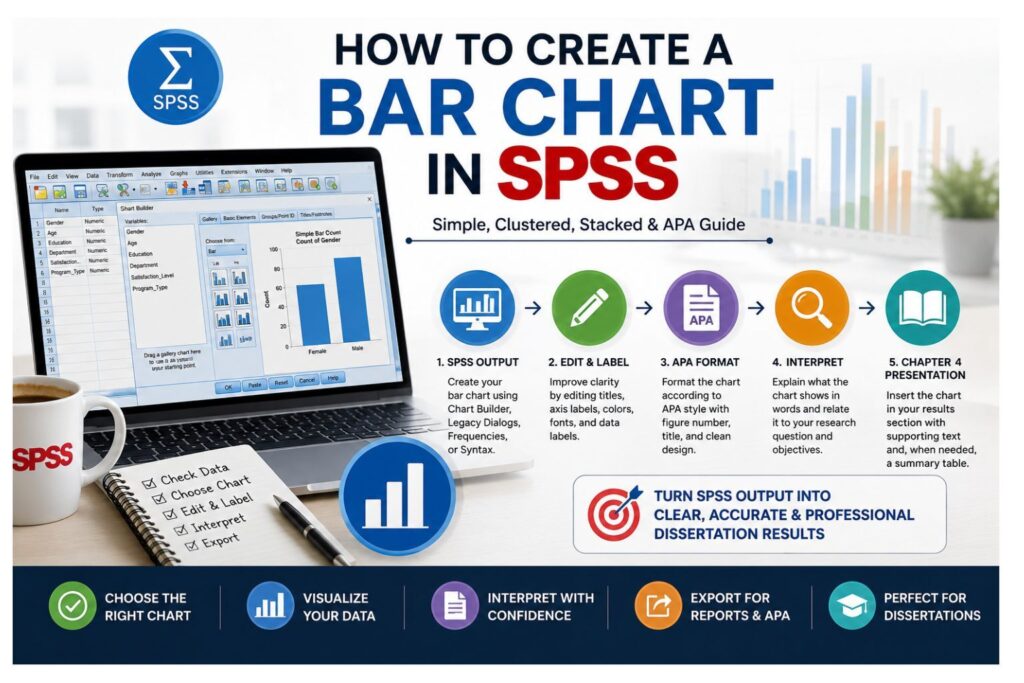
SPSS is popular among students because it provides a menu-driven workflow. Users can open a dataset, define variables, assign labels, set missing values, choose statistical tests from menus, and view output in a structured output viewer. This makes SPSS especially useful for students who are not comfortable with command-based statistical software.
One of the strongest features of SPSS for dissertation work is Variable View. Variable View allows students to define variable names, variable labels, value labels, missing value codes, measurement levels, and other properties. This is helpful when working with questionnaire data, Likert-scale responses, demographic variables, coded categories, and composite scale scores.
SPSS supports many procedures commonly used in student research, including descriptive statistics, frequencies, crosstabs, chi-square tests, t-tests, ANOVA, correlation, linear regression, logistic regression, reliability analysis, factor analysis, and nonparametric tests. IBM also highlights SPSS features for statistical testing, regression, forecasting, and extensible modeling.
SPSS also supports syntax. IBM’s SPSS command syntax documentation allows users to document and reproduce analysis steps through commands, which can be useful when supervisors ask how the analysis was conducted or when revisions require rerunning the same procedures.
SPSS may be especially useful when students need structured output, survey data coding, common inferential tests, and help writing the results chapter. Students who already have a dataset but are unsure how to analyze it can request SPSS data analysis help before submitting their findings.
What Is Stata?
Stata is a statistical software package developed by StataCorp. It is commonly used in economics, biostatistics, epidemiology, public health, political science, policy research, sociology, education, finance, business, medical research, and applied quantitative research. Stata’s features page lists several disciplines, including biostatistics, economics, education, epidemiology, finance, institutional research, medical research, political science, and psychology.
Stata is known for its command-based workflow. Although Stata includes menus, many users rely on commands and do-files. A do-file is a saved script that records the steps used to clean, transform, analyze, and report data. This makes Stata powerful for reproducible research because another person can review the commands and understand how the analysis was completed.
Stata is especially strong for regression analysis, panel data, longitudinal data, survival analysis, complex data management, visualization, and automated reporting. Stata’s official panel and longitudinal data resources describe tools for studying relationships across panels and examining how outcomes change over time.
Stata can be very efficient once a student learns the command structure. Instead of clicking through multiple menus, the user can write commands that clean variables, create new measures, run models, generate tables, and reproduce the full analysis. This is valuable for advanced research, journal manuscripts, and supervisor-reviewed projects where transparency matters.
However, Stata can feel harder for beginners. Students who are not used to commands may struggle with syntax rules, do-files, command output, and error messages. Stata is powerful, but it rewards users who are willing to learn a command-driven workflow.
SPSS vs Stata: Quick Comparison Table
| Feature | SPSS | Stata |
|---|---|---|
| Main workflow | Menu-driven with syntax options | Command-driven with menus |
| Ease of use | Easier for beginners | Steeper learning curve at first |
| Best for | Dissertation students, survey data, social science research | Econometrics, public health, policy, panel data, longitudinal analysis |
| Data setup | Data View and Variable View | Dataset structure controlled through commands and data editor |
| Reproducibility | SPSS syntax available | Commands and do-files are central |
| Survey data | Strong and student-friendly | Strong, especially for complex survey workflows |
| Regression | Strong for common dissertation models | Very strong for advanced and applied models |
| Panel data | Possible through some procedures, but less central | Very strong |
| Output style | Detailed output viewer | Compact command output |
| Beginner suitability | Usually easier | Better after learning commands |
| Supervisor familiarity | Very high in many dissertation settings | High in economics, public health, policy, and applied quantitative fields |
| Best beginner option | Usually SPSS | Stata if the course or field requires it |
| Best advanced option | SPSS for many applied dissertation analyses | Stata for advanced modeling, panel data, and reproducible workflows |
SPSS is often better when a student needs a guided interface, recognizable output, and common dissertation tests. Stata is often better when the research requires command-based reproducibility, advanced modeling, panel data, longitudinal analysis, or econometric methods.
Neither tool is automatically better. The better choice depends on your field, research design, data structure, supervisor expectations, and required statistical methods.
Is SPSS Better Than Stata?
SPSS may be better than Stata when the student is a beginner, the dissertation uses survey or questionnaire data, and the supervisor expects SPSS output. SPSS is also often better when the analysis involves common dissertation tests such as frequencies, descriptive statistics, t-tests, ANOVA, chi-square tests, correlation, reliability analysis, or standard regression models.
SPSS is easier for many students because the workflow is visual. Data View shows the dataset, Variable View helps define variables, and the Analyze menu provides access to common procedures. This helps students focus on interpreting results rather than learning command syntax.
SPSS may also be better when students need support writing Chapter 4. Many dissertation consultants, supervisors, and academic reviewers are familiar with SPSS tables. This makes it easier to identify important output, convert software results into APA-style paragraphs, and explain findings in relation to hypotheses.
SPSS is often suitable for students in psychology, nursing, education, healthcare, business, communication, social work, and social science programs. These fields frequently use survey datasets, Likert-scale responses, demographic comparisons, group differences, reliability analysis, and regression models.
However, SPSS is not automatically better for every project. If the dissertation involves panel data, econometrics, advanced causal inference, complex longitudinal modeling, or command-based reproducibility, Stata may be stronger.
Is Stata Better Than SPSS?
Stata may be better than SPSS when the project requires command-based reproducibility, advanced regression modeling, panel data, longitudinal data, survival analysis, or applied econometric methods. It is especially common in economics, public health, epidemiology, policy analysis, political science, and biostatistics.
Stata’s strength comes from its command structure. A researcher can create a do-file that imports data, cleans variables, labels categories, runs statistical models, saves output, and documents each step. This makes the analysis more transparent and easier to repeat.
Stata is also particularly strong for panel and longitudinal data. Stata’s official panel and longitudinal data resources state that users can fit linear and nonlinear models for binary, count, ordinal, censored, and survival outcomes with fixed-effects, random-effects, or population-averaged estimators.
Stata may also be better when the researcher needs robust standard errors, fixed effects, random effects, instrumental variables, difference-in-differences, survival models, or more advanced applied modeling workflows.
However, Stata is not always better for students who need a simple dissertation workflow. If the student’s analysis involves a basic survey dataset and common tests, SPSS may be easier and more efficient, especially when the supervisor expects SPSS output.
SPSS or Stata for Dissertation Data Analysis?
The correct choice for dissertation data analysis depends on the research design. A student should not choose software only because it looks easier or sounds more advanced. The software should fit the study.
Before choosing between SPSS and Stata, review your research questions, hypotheses, dependent variable, independent variables, measurement levels, sample size, data structure, statistical tests, supervisor preference, and reporting requirements.
SPSS is often a strong choice for common dissertation designs involving questionnaire data, Likert-scale items, group comparisons, descriptive statistics, correlation, regression, reliability analysis, and Chapter 4 reporting. It is also useful when the supervisor wants SPSS output or when the student needs a more guided interface.
Stata is often a strong choice for dissertations involving econometrics, public health modeling, policy analysis, panel data, longitudinal data, advanced regression, survival analysis, or reproducible command workflows.
| Dissertation Need | Better Fit |
|---|---|
| Supervisor asks for SPSS | SPSS |
| Beginner-friendly menu-based analysis | SPSS |
| Survey questionnaire with Likert-scale items | SPSS |
| Common dissertation tests | SPSS |
| Regression with standard predictors | SPSS or Stata |
| Econometrics dissertation | Stata |
| Public health or epidemiology modeling | Stata or SPSS, depending on method |
| Panel data analysis | Stata |
| Longitudinal data analysis | Often Stata |
| Complex survey design | Stata or SPSS Complex Samples |
| Chapter 4 results writing support | Depends on analyst expertise |
| Supervisor asks for Stata do-files | Stata |
A psychology student using Likert-scale survey data to compare group means may find SPSS more practical. A business student running standard multiple regression on survey responses can also use SPSS comfortably. A public health student analyzing repeated patient observations may need Stata, R, SAS, or another tool suited to longitudinal data. An economics student using country-level panel data will often find Stata more natural.
If your methodology chapter already states that you will use SPSS, you should normally complete the analysis in SPSS unless your supervisor approves a change. If your supervisor expects Stata do-files, then Stata may be required even if SPSS feels easier.
If you are unsure whether SPSS or Stata is suitable for your dissertation, our team can review your proposal, research questions, hypotheses, and dataset before recommending the best analysis route. You can also request dissertation data analysis support if your project has reached the analysis stage.
SPSS vs Stata for Survey Data
Both SPSS and Stata can analyze survey data, but they handle survey workflows differently.
SPSS is often easier for student questionnaire data. Variable View makes it simple to define item labels, demographic categories, value labels, missing values, and measurement levels. Students can run frequencies, descriptive statistics, crosstabs, reliability analysis, scale scores, t-tests, ANOVA, correlation, and regression through menus.
For example, a student with a survey on academic stress, patient satisfaction, employee motivation, or consumer behavior may find SPSS easier because it allows clear data setup and recognizable output. SPSS is also helpful when survey data must be summarized using frequency tables, means, standard deviations, reliability coefficients, and group comparisons.
Stata is also strong for survey data, especially when the dataset is large, complex, weighted, or requires reproducible cleaning. Stata can be efficient when a researcher needs to recode many variables, merge datasets, reshape data, apply survey design settings, or document every step through do-files.
For simple student questionnaires, SPSS is often easier. For complex survey designs, large public-use datasets, weighted analyses, or public health and policy datasets, Stata may be more efficient.
SPSS vs Stata for Regression Analysis
Both SPSS and Stata can run regression analysis. The better option depends on the complexity of the model and the student’s comfort with the software.
SPSS is strong for common dissertation regression models, including simple linear regression, multiple linear regression, logistic regression, ordinal regression, and multinomial logistic regression. IBM describes SPSS Regression as supporting prediction of categorical outcomes, regression models, model summaries, and nonlinear regression procedures.
SPSS is often easier when students need to run standard regression models and interpret output for Chapter 4. The output viewer provides model summaries, ANOVA tables, coefficients, significance values, confidence intervals, and diagnostic options.
Stata is often stronger for advanced regression workflows. Researchers commonly use Stata for robust standard errors, panel regression, fixed effects, random effects, instrumental variables, generalized linear models, survival models, difference-in-differences, and causal inference designs.
A student running a simple multiple regression for a psychology, education, nursing, or business dissertation may be comfortable in SPSS. A student working on an economics, policy, public health, or longitudinal project may need Stata because the model structure is more advanced.
Regression is also where many students make serious mistakes. They may choose the wrong outcome variable, ignore assumptions, fail to check multicollinearity, misread coefficients, or report p-values without explaining effect size and practical meaning. If regression is central to your study, you may need regression analysis support to make sure your model is appropriate and defensible.
SPSS vs Stata for Panel Data, Longitudinal Data, and Econometrics
Panel data and longitudinal data are major reasons researchers choose Stata over SPSS.
Panel data tracks multiple units over time. The units may be individuals, companies, countries, schools, hospitals, regions, or organizations. Longitudinal data follows the same subjects or units across repeated time points. These designs require methods that account for repeated observations, time effects, within-unit relationships, and between-unit differences.
Stata is widely used for panel data because it has a strong command-based workflow for longitudinal and panel models. Stata’s manual describes the xt series of commands as tools for analyzing panel data, also known as longitudinal data.
Econometrics often requires models beyond ordinary regression. A student may need fixed effects, random effects, instrumental variables, time-series procedures, robust standard errors, or causal inference methods. Stata is often a natural choice for these designs because many of these workflows are command-based and reproducible.
SPSS can support repeated measures, mixed models, and some advanced procedures, but it is not usually the first choice for panel econometric workflows. Students should not force SPSS into a project that clearly requires Stata, R, SAS, or specialized econometric software.
The safest decision is to match the software to the research design. If your study uses repeated observations over time, nested data, panel structures, or advanced econometric models, ask your supervisor which software is expected before starting the analysis.
SPSS vs Stata for Beginners
SPSS is usually easier for beginners. It uses menus, dialog boxes, Data View, Variable View, and clear output tables. A student can run basic analyses without learning many commands.
Stata can feel harder at first because users must learn commands, syntax rules, do-files, and command output. However, once students understand the workflow, Stata can become efficient and powerful. A do-file can rerun the full analysis, which is valuable when supervisors request revisions.
| Beginner Task | Easier Tool |
|---|---|
| Entering survey data manually | SPSS |
| Coding value labels | SPSS |
| Running frequencies | SPSS |
| Running basic t-tests and ANOVA | SPSS |
| Producing familiar dissertation output | SPSS |
| Learning commands | Stata |
| Reproducing analysis through scripts | Stata |
| Cleaning large datasets through code | Stata |
| Building command-based research workflow | Stata |
| Working with panel datasets | Stata |
A beginner should not choose Stata only because it sounds more advanced. A beginner should also not choose SPSS only because it looks easier. The best choice should match course requirements, dissertation design, and supervisor expectations.
SPSS vs Stata Output and Reporting
SPSS and Stata present output differently.
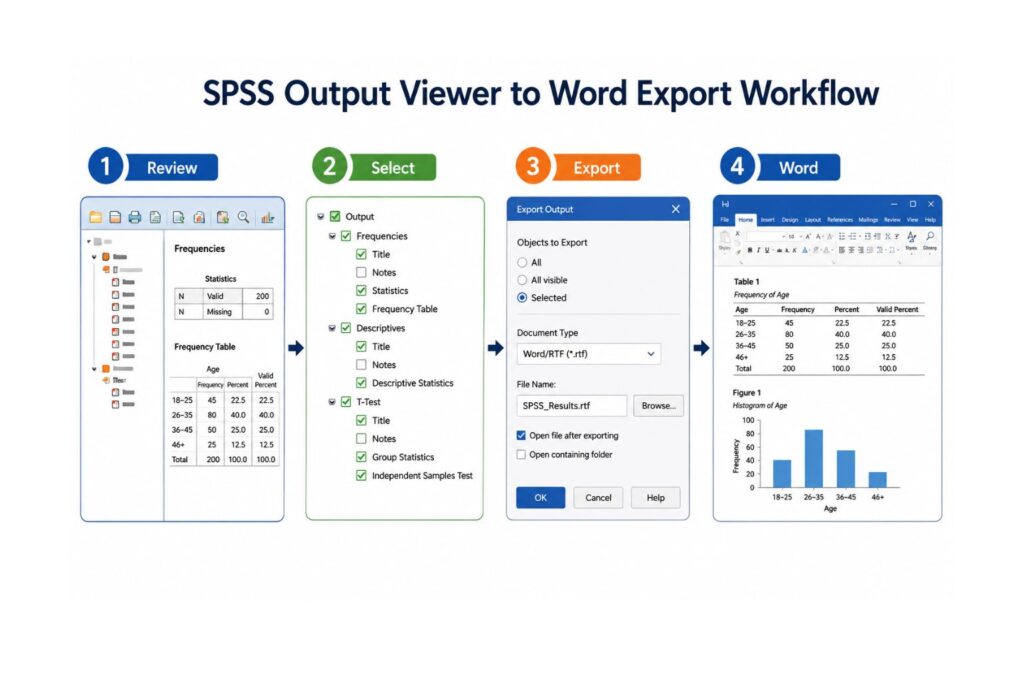
SPSS has a detailed output viewer. It can produce tables, charts, model summaries, coefficients, significance values, reliability tables, ANOVA tables, crosstabs, and assumption-related results. This output is familiar to many dissertation supervisors, especially in fields that commonly use questionnaire-based research.
Stata output is more compact and command-based. It displays results after commands and allows users to save workflows in do-files. This makes Stata strong for reproducibility, especially when the analysis must be revised or audited.
Neither SPSS output nor Stata output should be copied directly into a dissertation without interpretation. Students must convert output into clear academic writing. A good results section explains which test was used, why it was appropriate, whether assumptions were checked, what the results showed, whether the hypothesis was supported, and what the finding means.
SPSS output may be easier for students writing Chapter 4 because the tables are more visually structured. Stata output may be better for command-based research workflows where reproducibility is essential.
Students who already have SPSS output but do not know how to explain it can request results chapter statistics support for interpretation, APA tables, and dissertation-ready writing.
Common Statistical Tests in SPSS and Stata
SPSS and Stata overlap in many common statistical tests. The difference is not only what they can run, but how the user runs the test, checks assumptions, and reports results.
Descriptive Statistics
Descriptive statistics summarize the basic features of a dataset. Students use them to describe sample characteristics, demographic variables, scale scores, survey responses, and outcome variables.
Common descriptive statistics include frequencies, percentages, means, medians, standard deviations, minimums, maximums, skewness, and kurtosis. SPSS is often easier for beginners because descriptive statistics can be selected through menus. Stata can produce the same summaries efficiently through commands.
T-Tests
T-tests compare means. Common types include one-sample t-tests, independent samples t-tests, and paired samples t-tests.
SPSS is often easier for students because the dialog boxes guide the user through variable selection. Stata can run t-tests quickly through commands, which is useful when the user understands the syntax.
Students should report more than the p-value. A strong t-test interpretation should include the group means, mean difference, confidence interval, significance level, effect size where required, and practical meaning.
ANOVA and Group Comparisons
ANOVA compares means across three or more groups. Common types include one-way ANOVA, repeated measures ANOVA, and factorial ANOVA.
SPSS is often comfortable for dissertation students running common group comparisons. Stata can also run ANOVA and related models, but students may need stronger command knowledge.
Students often misinterpret ANOVA by stopping after the overall test. If the result is significant, post hoc tests or planned comparisons may be needed to show which groups differ.
Chi-Square Tests
Chi-square tests examine relationships between categorical variables. They are common in survey-based dissertations and social science research.
SPSS makes crosstabs and chi-square tests easy through menus. Stata can perform chi-square tests through commands and is efficient when working with larger datasets.
Students should check expected cell counts before interpreting chi-square results. If expected counts are too low, the test may not be appropriate.
Correlation
Correlation measures the strength and direction of association between two variables. Pearson correlation is common for continuous variables. Spearman correlation is often used for ordinal or non-normal data.
SPSS and Stata can both run correlation analyses. The main issue is interpretation. Students must avoid saying that correlation proves causation. Correlation shows association, not cause and effect.
Regression Analysis
Regression helps students examine prediction and relationships between variables. SPSS and Stata can both run linear regression, logistic regression, and other regression models.
SPSS is often easier for common dissertation regression. Stata is often stronger for advanced applied models, robust standard errors, fixed effects, random effects, panel models, and causal inference.
Regression interpretation should include model fit, coefficients, confidence intervals, p-values, assumptions, and practical meaning.
Reliability Analysis
Reliability analysis is common in questionnaire-based dissertations. Students often use Cronbach’s alpha to evaluate internal consistency among scale items.
SPSS is widely used for reliability analysis because the workflow is simple and the output is easy to read. Stata can also handle reliability analysis, but students may need to use commands.
Students should not rely only on a Cronbach’s alpha number. They should also consider item-total correlations, the number of items, construct theory, and whether the scale makes conceptual sense.
Advanced Modeling
Advanced modeling includes panel models, fixed effects, random effects, survival analysis, multilevel models, causal inference, and time-related methods.
Stata is often stronger in this area because it is designed for command-based applied quantitative research. Stata’s official panel data page describes options for fixed-effects, random-effects, population-averaged estimators, dynamic models, models with endogeneity, and nonlinear outcomes.
SPSS can support many applied analyses, but Stata is often preferred when the project is methodologically complex and requires advanced reproducible workflows.
Common Mistakes Students Make When Choosing SPSS or Stata
Students often choose software too early. They may pick SPSS because it looks easier or Stata because it sounds more advanced. Both approaches can cause problems if the software does not match the research design.
| Mistake | Why It Hurts the Project |
|---|---|
| Choosing software before reviewing the research design | The tool may not fit the required analysis |
| Using SPSS only because it looks easier | The project may require advanced modeling |
| Using Stata only because it sounds advanced | The student may struggle unnecessarily |
| Ignoring supervisor requirements | The output may be rejected or questioned |
| Running the wrong statistical test | The results may not answer the research question |
| Coding variables incorrectly | Output may become inaccurate |
| Treating Likert items incorrectly | The analysis may be challenged |
| Skipping assumption checks | Inferential results may be unreliable |
| Reporting p-values without effect sizes | Practical meaning may be missing |
| Running regression without diagnostics | The model may be weak or misleading |
| Copying raw output into the results chapter | The writing may look unprofessional |
| Failing to connect results to hypotheses | The chapter may lack analytical clarity |
The software choice matters, but the analysis plan matters more. A well-designed SPSS analysis is better than a poorly designed Stata analysis. A well-designed Stata analysis is better than a poorly designed SPSS analysis.
SPSS vs Stata Decision Framework
Use this quick framework before choosing your software.
| Your Situation | Recommended Tool |
|---|---|
| You are new to statistics | SPSS |
| Your supervisor asks for SPSS | SPSS |
| You have Likert-scale questionnaire data | SPSS |
| You need frequencies, t-tests, ANOVA, chi-square, correlation, or basic regression | SPSS |
| You need clear output for Chapter 4 writing | SPSS |
| You are working with panel data | Stata |
| You need fixed-effects or random-effects models | Stata |
| You need command-based reproducibility | Stata |
| Your supervisor asks for do-files | Stata |
| You are doing econometrics or policy modeling | Stata |
| You are unsure which tool fits your study | Ask for statistical test selection support |
This table should not replace your supervisor’s instructions. It should help you think through the decision before you commit to software, write your methodology chapter, or run final analysis.
When Should You Request SPSS Data Analysis Help?
You should request SPSS data analysis help when you have data but are unsure how to clean it, code it, analyze it, or interpret it. You may also need help if your supervisor has asked for revisions and you do not know how to correct the analysis.
At SPSSDissertationHelp.com, students can request support with choosing between SPSS and Stata, reviewing research questions, preparing an analysis plan, cleaning datasets, setting up variables in SPSS, selecting the correct statistical tests, running SPSS analysis, interpreting output, checking assumptions, creating APA-style tables, and writing Chapter 4 results.
This support is useful when your dissertation depends on accurate statistical decisions. Software can calculate results, but it cannot decide whether the test is appropriate, whether assumptions are met, or whether the interpretation answers the research question.
You can request help with:
- Choosing between SPSS and Stata
- Reviewing research questions and hypotheses
- Preparing a statistical analysis plan
- Cleaning and coding datasets
- Setting up variables in SPSS
- Selecting the correct statistical test
- Running SPSS analysis
- Interpreting SPSS output
- Checking assumptions
- Creating APA-style tables
- Writing Chapter 4 results
- Revising analysis after supervisor feedback
Request SPSS Data Analysis Help
SPSS vs Stata: Which One Should You Choose?
Choose SPSS if you are a beginner, your supervisor expects SPSS, your dissertation uses survey data, or your project requires common statistical tests. SPSS is also a strong choice when you prefer menus and dialog boxes, need recognizable output, and want help writing Chapter 4.
Choose Stata if your field commonly uses Stata, your supervisor expects do-files, your study uses panel data, or your analysis involves econometrics, public health modeling, epidemiology, policy research, longitudinal data, or advanced regression methods.
| Choose SPSS If… | Choose Stata If… |
|---|---|
| You are a beginner | You are comfortable learning commands |
| Your supervisor expects SPSS | Your supervisor expects Stata do-files |
| Your dissertation uses survey data | Your study uses panel or longitudinal data |
| You need common statistical tests | You need advanced modeling |
| You prefer menus and dialog boxes | You prefer reproducible scripts |
| You need recognizable dissertation output | Your field commonly uses Stata |
| You need Chapter 4 support | You need command-based documentation |
The best software is the one that fits your research design, supervisor expectations, data structure, and reporting requirements. Do not choose software based only on popularity. Choose the tool that helps you complete a defensible and clearly reported analysis.
FAQs About SPSS vs Stata
SPSS is better for many beginners, menu-based analysis, survey data, and common dissertation projects. Stata may be better for advanced modeling, panel data, longitudinal analysis, econometrics, and command-based workflows.
Stata is better when the project requires reproducible commands, panel data, longitudinal data, public health modeling, econometrics, or advanced regression methods. SPSS may be better when the student needs a simpler interface and familiar dissertation output.
SPSS is usually easier at first because it uses menus, dialog boxes, Data View, Variable View, and structured output tables. Stata has a steeper learning curve because users often rely on commands and do-files.
Use the software that matches your supervisor’s requirements, research design, data structure, and statistical tests. SPSS is often safer for common dissertation analysis. Stata may be better for econometric, panel, longitudinal, or advanced applied research designs.
Yes. SPSS is good for common regression analyses used in dissertations, including linear regression, multiple regression, logistic regression, ordinal regression, and multinomial regression.
Yes. Stata is very strong for regression analysis, especially advanced modeling, robust standard errors, panel regression, fixed effects, random effects, instrumental variables, and applied quantitative research.
SPSS is often easier for student questionnaire data because of Variable View, value labels, frequencies, crosstabs, reliability analysis, and familiar output. Stata may be better for complex survey designs, large datasets, weighted analyses, and reproducible workflows.
Stata is usually better for panel data because it has strong panel and longitudinal data tools, including fixed-effects and random-effects workflows.
SPSS and Stata overlap for many common tests, including descriptive statistics, t-tests, ANOVA, chi-square tests, correlation, regression, and reliability analysis. However, they differ in workflow, output style, extensions, and advanced modeling strengths.
You may need a statistician if you are unsure which test to use, how to code variables, how to check assumptions, how to interpret regression output, or how to write dissertation-ready results. Software can run tests, but it cannot guarantee that your analysis is correct.
No. Beginners can learn Stata, especially if their course or field requires it. However, Stata usually requires more comfort with commands than SPSS.
Yes. Some students use SPSS for basic data exploration and Stata for advanced modeling. However, your final analysis should be consistent, documented, and approved by your supervisor.
Conclusion
SPSS and Stata are both strong statistical software packages, but they are best suited for different research needs. SPSS is often better for students who need a beginner-friendly interface, survey data analysis, common dissertation tests, recognizable output, and Chapter 4 support. Stata is often better for researchers who need command-based reproducibility, panel data, longitudinal analysis, econometrics, public health modeling, policy research, and advanced regression workflows.
For students comparing SPSS vs Stata, the right question is not simply, “Which software is better?” The better question is, “Which software fits my research design, supervisor expectations, dataset, statistical methods, and reporting requirements?”
If you are working on a dissertation, thesis, research paper, or journal manuscript and you are unsure whether to use SPSS or Stata, contact spssdissertationhelp.com for professional statistical analysis support.