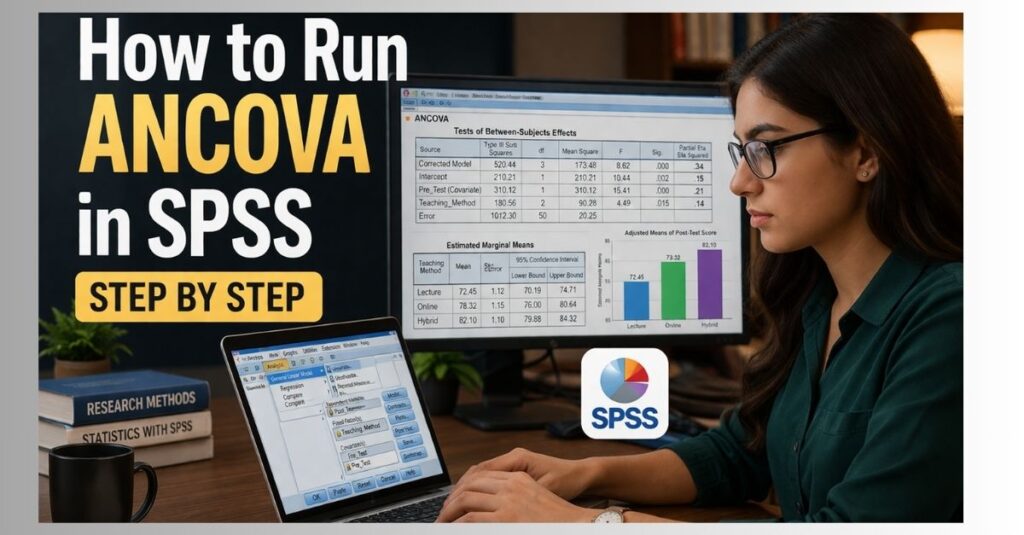
How to Run ANCOVA in SPSS
ANCOVA, also known as analysis of covariance, is used when you want to compare group means while controlling for another variable that may influence the outcome. It is commonly used in dissertations, theses, journal articles, class assignments, and applied research projects where the researcher needs to compare groups while accounting for a covariate.
In simple terms, ANCOVA helps answer this question:
Do the groups still differ after adjusting for another variable?
For example, a psychology student may compare post-test anxiety scores across therapy groups while controlling for baseline anxiety. An education researcher may compare final exam scores across teaching methods while controlling for pre-test scores. A nursing or public health researcher may compare recovery scores across treatment groups while adjusting for age, baseline health score, or another relevant covariate.
ANCOVA is useful because it compares adjusted means instead of relying only on raw means. Raw means show the average score for each group before adjustment. Adjusted means show the estimated group means after controlling for the covariate. This matters when the covariate is related to the dependent variable.
For example, if one group had higher baseline scores before an intervention, that group may also have higher final scores. ANCOVA helps adjust for the baseline difference so the group comparison is more meaningful.
This page explains how to run ANCOVA in SPSS, when to use it, how to check ANCOVA assumptions, how to interpret SPSS ANCOVA output, and how to report ANCOVA results in APA style. If you need support with your own data, our SPSS Statistics Help service can help with variable review, assumption testing, SPSS output, interpretation, and academic reporting.
What Is ANCOVA in SPSS?
ANCOVA stands for analysis of covariance. It is a statistical test used to compare the means of two or more groups while controlling for one or more covariates. In SPSS, ANCOVA is usually performed through the General Linear Model procedure.
ANCOVA combines two statistical ideas:
| Method | Role in ANCOVA |
|---|---|
| ANOVA | Compares group means |
| Regression | Controls for the effect of a covariate |
The covariate is included because it may influence the dependent variable. By adjusting for the covariate, ANCOVA estimates whether the group difference remains after that influence is taken into account.
A basic ANCOVA includes three main parts:
| Element | Meaning | Example |
|---|---|---|
| Dependent variable | The outcome being measured | Final exam score |
| Independent variable or factor | The group being compared | Teaching method |
| Covariate | A control variable related to the outcome | Pre-test score |
The dependent variable should usually be continuous. The independent variable should usually be categorical. The covariate should usually be continuous and meaningfully related to the dependent variable.
For example, suppose a researcher wants to compare final exam scores among students taught using three different teaching methods. If students had different pre-test scores before the teaching method was introduced, pre-test score may affect final exam score. In that case, ANCOVA can compare the teaching methods while controlling for pre-test score.
The main research question becomes:
Are there significant differences in final exam scores between teaching methods after controlling for pre-test score?
This is why ANCOVA is widely used in dissertation research. Many studies include baseline scores, demographic variables, previous experience, prior ability, income, age, or other variables that may influence the outcome. ANCOVA provides a structured way to control for those variables when the research design supports it.
When Should You Use ANCOVA?
You should use ANCOVA when your research question involves comparing two or more groups on a continuous outcome while controlling for one or more covariates.
ANCOVA may be appropriate when:
| Research situation | Example |
|---|---|
| You are comparing group means | Comparing three intervention groups |
| Your dependent variable is continuous | Test score, anxiety score, satisfaction score |
| Your independent variable is categorical | Treatment group, program type, teaching method |
| You have a meaningful covariate | Age, baseline score, income, pre-test score |
| You want adjusted group differences | Group differences after controlling for the covariate |
A typical ANCOVA research question may be:
Is there a significant difference in post-test performance between students taught using three different teaching methods after controlling for pre-test performance?
In this example:
| Variable role | Variable |
|---|---|
| Dependent variable | Post-test performance |
| Fixed factor | Teaching method |
| Covariate | Pre-test performance |
ANCOVA is often used when the researcher wants to control for a variable that is not the main focus of the study but may influence the outcome. This can improve the precision of the group comparison.
Common ANCOVA research examples include:
| Field | Example ANCOVA question |
|---|---|
| Education | Do teaching methods differ in final exam performance after controlling for pre-test score? |
| Psychology | Do therapy groups differ in post-treatment anxiety after controlling for baseline anxiety? |
| Nursing | Do patient groups differ in recovery score after controlling for age? |
| Business | Do training programs differ in employee performance after controlling for years of experience? |
| Public health | Do intervention groups differ in health outcomes after controlling for baseline health status? |
| Social sciences | Do groups differ in attitudes after controlling for income or education level? |
If your study only compares group means without a covariate, ANOVA may be more appropriate. You can review our guide on How to Perform One-Way ANOVA in SPSS if your analysis does not include a covariate.
If your research involves several predictors, categorical outcomes, repeated measures, multiple dependent variables, or prediction-focused hypotheses, ANCOVA may not be the best option. Our Dissertation Data Analysis Help service can help identify the correct statistical test for your research design.
ANCOVA vs ANOVA: What Is the Difference?
ANOVA compares group means. ANCOVA compares group means after adjusting for a covariate.
This difference is important because group means can be affected by another variable. Suppose three student groups have different final exam scores, but one group already had higher pre-test scores before the teaching method was introduced. A simple ANOVA may show a difference between groups, but it does not account for the baseline difference.
ANCOVA adjusts for the covariate before comparing the groups. This allows the researcher to examine the group effect while accounting for the covariate.
| Feature | ANOVA | ANCOVA |
|---|---|---|
| Main purpose | Compare group means | Compare adjusted group means |
| Covariate included | No | Yes |
| Common use | Simple group comparison | Group comparison with statistical control |
| Example | Compare satisfaction across departments | Compare satisfaction across departments while controlling for age |
| Main output focus | Mean differences | Adjusted means and covariate-adjusted group effect |
ANOVA is suitable when the research question only involves comparing means between groups. ANCOVA is suitable when the researcher also needs to control for another variable.
Examples:
| Research question | Better test |
|---|---|
| Do three teaching methods differ in final exam scores? | ANOVA |
| Do three teaching methods differ in final exam scores after controlling for pre-test score? | ANCOVA |
| Does age predict final exam score? | Regression |
| Do teaching method and gender affect final exam score after controlling for pre-test score? | Two-way ANCOVA |
ANCOVA should be selected because it fits the research question, not because it appears more advanced. The covariate should make sense theoretically and should be relevant to the dependent variable.
One-Way ANCOVA in SPSS
A one-way ANCOVA is used when you have one categorical independent variable and at least one covariate.
Example:
A researcher wants to compare depression scores across three therapy types while controlling for baseline depression.
| Variable | Role |
|---|---|
| Depression score after therapy | Dependent variable |
| Therapy type | Fixed factor |
| Baseline depression score | Covariate |
This is called one-way ANCOVA because there is one main grouping variable.
In SPSS, a one-way ANCOVA is usually run through:
Analyze > General Linear Model > Univariate
The dependent variable goes into the Dependent Variable box. The categorical group variable goes into Fixed Factor(s). The covariate goes into Covariate(s).
A one-way ANCOVA can tell you whether the adjusted mean outcome differs across the groups. If the main group effect is significant, pairwise comparisons may be used to identify which groups differ from each other.
A one-way ANCOVA is often used in pre-test and post-test studies. The post-test score is entered as the dependent variable, the group is entered as the fixed factor, and the pre-test score is entered as the covariate.
Example setup:
| Study design | ANCOVA setup |
|---|---|
| Compare three intervention groups | Group is the fixed factor |
| Measure outcome after intervention | Post-test score is the dependent variable |
| Control for baseline level | Pre-test score is the covariate |
This design is common in education, psychology, health sciences, business, and social science research.
Two-Way ANCOVA in SPSS
A two-way ANCOVA is used when you have two categorical independent variables and at least one covariate.
Example:
A researcher wants to examine whether teaching method and gender affect final exam scores after controlling for pre-test scores.
| Variable | Role |
|---|---|
| Final exam score | Dependent variable |
| Teaching method | Fixed factor 1 |
| Gender | Fixed factor 2 |
| Pre-test score | Covariate |
A two-way ANCOVA can test:
| Effect | Meaning |
|---|---|
| Main effect of teaching method | Whether adjusted exam scores differ by teaching method |
| Main effect of gender | Whether adjusted exam scores differ by gender |
| Interaction effect | Whether the effect of teaching method depends on gender |
| Covariate effect | Whether pre-test score is related to final exam score |
The interaction effect is important in a two-way ANCOVA. An interaction means that the effect of one factor changes depending on the level of the other factor.
For example, a teaching method may improve final exam scores for one student group but not another. If the interaction is significant, the interpretation should focus on how the factors work together before making broad conclusions about the main effects.
A two-way ANCOVA may be used when a dissertation hypothesis includes two independent variables. It can also be used when the researcher wants to examine whether the effect of one factor differs across levels of another factor.
If you are unsure whether your project needs one-way ANCOVA, two-way ANCOVA, ANOVA, regression, MANCOVA, or another test, our SPSS Help Online service can review your research question and dataset.
Variables Needed for ANCOVA in SPSS
Before running ANCOVA in SPSS, your dataset should be arranged correctly. Each row should represent one participant, case, or observation. Each column should represent one variable.
A simple dataset may look like this:
| Participant | Group | PreTestScore | PostTestScore |
|---|---|---|---|
| 1 | 1 | 62 | 78 |
| 2 | 1 | 59 | 74 |
| 3 | 2 | 65 | 82 |
| 4 | 2 | 61 | 80 |
| 5 | 3 | 58 | 76 |
In SPSS Variable View, the variables may be set up like this:
| Variable | Measure |
|---|---|
| Group | Nominal |
| PreTestScore | Scale |
| PostTestScore | Scale |
The dependent variable and covariate should usually be set as Scale. The grouping variable should usually be set as Nominal or Ordinal, depending on the research design.
The variable setup matters because SPSS treats variables differently depending on where they are entered. A categorical group variable should be entered as a fixed factor. A continuous control variable should be entered as a covariate.
Common setup mistakes include:
| Mistake | Possible issue |
|---|---|
| Entering a group variable as a covariate | SPSS treats group codes as continuous values |
| Entering a covariate as a fixed factor | SPSS treats continuous values as separate categories |
| Not defining value labels | Output becomes harder to read |
| Using unclear variable names | Results are harder to interpret |
| Leaving missing values unreviewed | Sample size may change across analyses |
| Mixing string and numeric codes | SPSS may not process the variable as expected |
Before running ANCOVA, it is useful to check the dataset for missing values, coding errors, outliers, duplicate entries, incorrect value labels, and incorrect measurement levels. These issues can affect the SPSS output and the final interpretation.
ANCOVA Assumptions in SPSS
ANCOVA has assumptions that should be checked before interpreting the results. These assumptions help determine whether the model is appropriate for the data.
The main ANCOVA assumptions are:
| Assumption | What it means |
|---|---|
| Independent observations | Each case should be independent |
| Continuous dependent variable | The outcome should be measured at scale level |
| Categorical independent variable | The factor should contain two or more groups |
| Continuous covariate | The covariate should usually be scale-level |
| Linearity | The covariate should relate linearly to the dependent variable |
| Homogeneity of regression slopes | The covariate-outcome relationship should be similar across groups |
| Homogeneity of variance | Error variances should be reasonably similar across groups |
| Normality of residuals | Model residuals should be approximately normally distributed |
| No extreme outliers | Outliers should not strongly distort the model |
The assumptions matter because ANCOVA adjusts group means based on the covariate. If the covariate does not relate to the dependent variable in a suitable way, or if the relationship differs strongly across groups, the adjusted results may require a different interpretation.
In dissertation and thesis research, assumption testing is often expected in the results chapter or statistical analysis section. The amount of detail depends on the university, supervisor, journal, or assignment instructions.
A practical ANCOVA review usually includes:
| Assumption area | Common SPSS review |
|---|---|
| Variable type | Variable View and coding review |
| Outliers | Boxplots, standardized residuals, descriptive checks |
| Linearity | Scatterplots between covariate and dependent variable |
| Homogeneity of regression slopes | Factor by covariate interaction |
| Homogeneity of variance | Levene’s Test |
| Normality | Residual plots or normality checks |
| Missing data | Frequency tables and valid case counts |
Not every project requires the same level of reporting, but the assumptions should be reviewed before final conclusions are written.
Homogeneity of Regression Slopes in ANCOVA
The homogeneity of regression slopes assumption checks whether the relationship between the covariate and the dependent variable is similar across groups.
For example, if pre-test score is the covariate and post-test score is the dependent variable, ANCOVA assumes that the relationship between pre-test and post-test scores is similar in each group.
In SPSS, this assumption can be checked by including an interaction term between the factor and covariate.
Example:
Group × PreTestScore
If the interaction is not statistically significant, the assumption is usually considered met. If the interaction is statistically significant, the relationship between the covariate and outcome may differ across groups.
This assumption is important because a violation can change how the ANCOVA model should be interpreted.
A significant factor by covariate interaction may suggest that the covariate does not have the same effect across all groups. In that case, the researcher may need to consider a model that includes the interaction, a separate analysis by group, or another statistical approach depending on the research question.
For dissertation writing, the homogeneity of regression slopes assumption is usually reported briefly. A simple statement may explain whether the interaction between the factor and covariate was significant and whether the assumption was satisfied.
How to Check Homogeneity of Regression Slopes in SPSS
To check homogeneity of regression slopes in SPSS:
- Click Analyze.
- Click General Linear Model.
- Click Univariate.
- Move the dependent variable into the Dependent Variable box.
- Move the grouping variable into Fixed Factor(s).
- Move the covariate into Covariate(s).
- Click Model.
- Select Custom.
- Add the main effect of the factor.
- Add the main effect of the covariate.
- Add the interaction between the factor and covariate.
- Click Continue.
- Click OK.
In the Tests of Between-Subjects Effects table, look for the interaction between the factor and the covariate.
| Result | Interpretation |
|---|---|
| Interaction is not significant | Homogeneity of regression slopes is likely met |
| Interaction is significant | The assumption may be violated |
Example interpretation:
| Output result | Meaning |
|---|---|
| Group × PreTestScore, p = .421 | Assumption likely met |
| Group × PreTestScore, p = .018 | Possible violation |
For the final ANCOVA model, if the interaction is not significant, the interaction term is usually removed and the main ANCOVA model is run. If the interaction is significant, interpretation becomes more complex because the relationship between the covariate and outcome differs by group.
This step is especially important for dissertation, thesis, and journal-level research.
Homogeneity of Variance in ANCOVA
ANCOVA also assumes that error variances are reasonably similar across groups. In SPSS, this is commonly checked using Levene’s Test of Equality of Error Variances.
| Levene’s Test result | Interpretation |
|---|---|
| p > .05 | Homogeneity of variance is usually considered met |
| p < .05 | Homogeneity of variance may be violated |
If Levene’s Test is significant, the result should be reviewed in relation to the sample size, group sizes, and overall research design.
For example, a significant Levene’s Test may be more concerning when group sizes are very unequal. If group sizes are similar and the sample is reasonably large, the impact may be less severe, but the issue should still be addressed where required.
A clean reporting statement may look like this:
Levene’s Test was not significant, p = .274, indicating that the homogeneity of variance assumption was met.
If the assumption is not met:
Levene’s Test was significant, p = .031, suggesting that the homogeneity of variance assumption may have been violated.
You can read more about this assumption in our guide on the SPSS Homogeneity of Variance Test.
How to Run ANCOVA in SPSS Step by Step
The following steps show how to run a standard one-way ANCOVA in SPSS.
Step 1: Open Your Dataset
Open your SPSS data file. Confirm that your variables are clearly named and coded.
You should have:
| Variable type | Example |
|---|---|
| Dependent variable | PostTestScore |
| Fixed factor | Group |
| Covariate | PreTestScore |
Before running the test, scan the dataset for missing values, incorrect codes, and unusual values. For example, if the group variable should only contain values 1, 2, and 3, make sure there are no accidental values such as 4, 99, or blank entries.
Clear variable names also make the output easier to interpret. Names such as PostTestScore, TreatmentGroup, and BaselineScore are easier to understand than generic names such as VAR0001 or Score2.
Step 2: Check Variable View
Go to Variable View and confirm the correct measurement level.
| Variable | Type | Measure |
|---|---|---|
| PostTestScore | Numeric | Scale |
| Group | Numeric or string | Nominal |
| PreTestScore | Numeric | Scale |
If the group variable is numeric, define value labels.
Example:
| Code | Label |
|---|---|
| 1 | Control group |
| 2 | Treatment group A |
| 3 | Treatment group B |
This makes the output easier to read and helps prevent reporting errors. When value labels are set correctly, SPSS output will show meaningful group names instead of only numeric codes.
Step 3: Open the Univariate Dialog
Click:
Analyze > General Linear Model > Univariate
This is the main SPSS path used for ANCOVA. The Univariate dialog is used because ANCOVA normally has one dependent variable. If your study has more than one dependent variable, MANCOVA or another model may be needed instead.
Step 4: Enter the Dependent Variable
Move your outcome variable into the Dependent Variable box.
Example:
PostTestScore
This is the variable you want to compare across groups after controlling for the covariate. The dependent variable should usually be continuous and measured at scale level.
Step 5: Enter the Fixed Factor
Move your categorical independent variable into Fixed Factor(s).
Example:
Group
This is the variable that defines the groups being compared. A fixed factor may have two groups or more than two groups. Examples include treatment group, teaching method, program type, gender, department, condition, or intervention group.
Step 6: Enter the Covariate
Move your continuous control variable into Covariate(s).
Example:
PreTestScore
This is the variable SPSS will adjust for when comparing the groups. The covariate should be relevant to the dependent variable and should make sense based on the research design.
Common covariates include:
| Covariate | Common research use |
|---|---|
| Pre-test score | Controls for baseline performance |
| Age | Controls for age-related differences |
| Income | Controls for socioeconomic differences |
| Baseline health score | Controls for initial health status |
| Years of experience | Controls for prior professional exposure |
| Prior achievement | Controls for academic background |
Step 7: Set the Model
For a standard one-way ANCOVA, SPSS will often use the correct model by default.
If you are checking homogeneity of regression slopes, click Model, choose Custom, and add the interaction between the factor and covariate.
For the final ANCOVA model, if the interaction is not significant, the interaction is usually removed and the main ANCOVA model is run.
A common analysis sequence is:
| Stage | Model |
|---|---|
| Assumption check | Factor, covariate, and factor × covariate interaction |
| Final ANCOVA | Factor and covariate without the interaction, if assumption is met |
This separates the assumption check from the final model used for reporting the main ANCOVA result.
Step 8: Request Estimated Marginal Means
Click Estimated Marginal Means.
Move your factor into the Display Means for box.
Select Compare main effects if you need pairwise group comparisons.
Estimated marginal means are important because ANCOVA focuses on adjusted group means. These are the means after controlling for the covariate.
If your factor has more than two groups, pairwise comparisons can help identify which specific groups differ. Depending on the project, you may also need a correction method for multiple comparisons.
Step 9: Request Descriptive Statistics and Effect Size
Click Options.
Select the relevant output options:
| Option | Why it matters |
|---|---|
| Descriptive statistics | Shows raw group means and standard deviations |
| Estimates of effect size | Provides partial eta squared |
| Homogeneity tests | Provides Levene’s Test |
| Parameter estimates | Supports model interpretation |
| Observed power | Sometimes requested by supervisors or assignment briefs |
Move your factor into Display Means for if needed.
Click Continue.
Descriptive statistics help you understand the raw group pattern. Effect size helps show the strength of the result. Homogeneity tests help evaluate one of the key assumptions.
Step 10: Run the Analysis
Click OK.
SPSS will generate several output tables. The most important tables usually include:
| SPSS output table | Purpose |
|---|---|
| Descriptive Statistics | Shows raw group means |
| Levene’s Test | Checks homogeneity of variance |
| Tests of Between-Subjects Effects | Shows the main ANCOVA result |
| Estimated Marginal Means | Shows adjusted group means |
| Pairwise Comparisons | Shows which groups differ, if requested |
The output should be reviewed in order. Start with assumptions, then move to the main ANCOVA result, then adjusted means, then pairwise comparisons if applicable.
How to Interpret ANCOVA Output in SPSS
After running ANCOVA, focus on the output that answers the research question and supports the results section.
Descriptive Statistics Table
The Descriptive Statistics table shows the raw mean, standard deviation, and sample size for each group.
This table helps describe the data, but it is not the final ANCOVA result. ANCOVA interpretation focuses on adjusted means and the Tests of Between-Subjects Effects table.
Example:
| Group | Raw mean | Standard deviation | N |
|---|---|---|---|
| Control | 70.20 | 8.40 | 30 |
| Treatment A | 76.50 | 7.90 | 30 |
| Treatment B | 79.10 | 8.10 | 30 |
These raw means show the unadjusted group pattern. The adjusted means may differ after controlling for the covariate.
Levene’s Test of Equality of Error Variances
Levene’s Test checks whether the error variances are reasonably similar across groups.
| p-value | Interpretation |
|---|---|
| p > .05 | Assumption is usually considered met |
| p < .05 | Assumption may be violated |
If Levene’s Test is significant, the assumption should be addressed in the interpretation. The appropriate next step depends on the sample size, group balance, and research requirements.
Tests of Between-Subjects Effects
The Tests of Between-Subjects Effects table is the main ANCOVA output table.
Look for the row containing your independent variable or factor.
Example:
Group
The key values are:
| Column | Meaning |
|---|---|
| F | Test statistic |
| df | Degrees of freedom |
| Sig. | p-value |
| Partial Eta Squared | Effect size |
If the p-value for the group variable is less than .05, the adjusted group means are significantly different.
You should also review the covariate row. If the covariate is significant, it means the covariate is significantly related to the dependent variable.
Example interpretation:
| Source | Interpretation |
|---|---|
| Covariate significant | The covariate is related to the dependent variable |
| Group significant | Adjusted group means differ |
| Group not significant | Adjusted group means do not differ significantly |
The group row usually answers the main ANCOVA research question.
Estimated Marginal Means
Estimated marginal means are the adjusted means. These are the group means after controlling for the covariate.
Example:
| Group | Adjusted mean |
|---|---|
| Control | 72.40 |
| Treatment A | 78.65 |
| Treatment B | 81.12 |
These adjusted means are central to ANCOVA interpretation because they reflect the group comparison after statistical adjustment.
A results section may include both raw means and adjusted means, but the ANCOVA conclusion should be based on the adjusted means and the Tests of Between-Subjects Effects table.
Pairwise Comparisons
If your factor has more than two groups and the main effect is significant, pairwise comparisons can show which groups differ.
Example:
| Comparison | p-value | Interpretation |
|---|---|---|
| Control vs Treatment A | .032 | Significant difference |
| Control vs Treatment B | .004 | Significant difference |
| Treatment A vs Treatment B | .218 | No significant difference |
Pairwise comparisons should be reported when they are relevant to the research question or required by the assignment, thesis, dissertation, or manuscript.
A clear interpretation should explain both the statistical result and the direction of the difference. For example, it is not enough to say that two groups differ. The write-up should say which group had the higher adjusted mean.
How to Report ANCOVA Results in APA Style
An ANCOVA results paragraph should include the purpose of the analysis, variables, assumption checks where required, the main result, effect size, adjusted means, and pairwise comparisons if applicable.
| Element | Include it? |
|---|---|
| Purpose of the analysis | Yes |
| Dependent variable | Yes |
| Grouping variable | Yes |
| Covariate | Yes |
| Assumption checks | Usually yes |
| Main ANCOVA result | Yes |
| F statistic, degrees of freedom, and p-value | Yes |
| Effect size | Yes |
| Adjusted means | Yes |
| Pairwise comparisons | If relevant |
A strong ANCOVA write-up should clearly connect back to the research question. It should also avoid reporting unnecessary tables that do not support the answer.
Example APA-Style ANCOVA Write-Up
An analysis of covariance was conducted to examine whether post-test scores differed across the three teaching method groups after controlling for pre-test scores. The covariate, pre-test score, was significantly related to post-test score, F(1, 86) = 24.18, p < .001, partial η² = .22. After adjusting for pre-test scores, there was a significant effect of teaching method on post-test scores, F(2, 86) = 5.47, p = .006, partial η² = .11. The adjusted means indicated that students in the interactive learning group scored higher than students in the lecture-only group. Pairwise comparisons showed that the difference between the interactive learning group and lecture-only group was statistically significant, p = .004.
Your actual write-up should match your own variables, sample size, hypotheses, output, assumptions, and university requirements.
If you need your ANCOVA output interpreted and written in an academic format, our Hire SPSS Expert service can help prepare clear results based on your SPSS output.
Common Mistakes When Running ANCOVA in SPSS
ANCOVA can produce misleading results when the model is not set up correctly. Common mistakes include:
| Mistake | Why it matters |
|---|---|
| Using ANCOVA without a meaningful covariate | The model may not be appropriate |
| Treating a categorical variable as a covariate | The analysis may be incorrectly specified |
| Ignoring homogeneity of regression slopes | The adjusted comparison may not be valid |
| Reporting only raw means | ANCOVA focuses on adjusted means |
| Forgetting effect size | The result lacks practical interpretation |
| Misreading the covariate row as the main result | The factor row usually answers the group comparison question |
| Reporting unnecessary SPSS tables | The results section may become unclear |
| Using ANCOVA when regression is more suitable | The analysis may not match the research question |
| Failing to connect results to hypotheses | The findings may not answer the study aims |
A well-reported ANCOVA explains the covariate, adjusted group differences, effect size, assumptions, and connection to the research question.
Many ANCOVA errors happen before the analysis is run. For example, if the research question is unclear, the wrong covariate is selected, or variables are placed into the wrong SPSS boxes, the output may not answer the study aim. Reviewing the research design before running the analysis can prevent these problems.
ANCOVA for Dissertation and Thesis Research
ANCOVA is often used in dissertation and thesis research because many studies compare groups while controlling for baseline scores, demographic variables, or other relevant covariates.
Common dissertation uses include:
| Discipline | ANCOVA example |
|---|---|
| Psychology | Comparing therapy outcomes while controlling for baseline symptoms |
| Education | Comparing teaching methods while controlling for prior achievement |
| Nursing | Comparing patient recovery scores while controlling for age |
| Public health | Comparing intervention outcomes while controlling for baseline health status |
| Business | Comparing employee performance across training groups while controlling for experience |
| Social sciences | Comparing attitudes across groups while controlling for income or education |
At dissertation level, ANCOVA should align with the research questions, hypotheses, methodology chapter, and results chapter. The results should also be written in a way that is clear enough for committee review.
A dissertation ANCOVA section may need to include:
| Dissertation requirement | What it may include |
|---|---|
| Test justification | Why ANCOVA was selected |
| Variable identification | Dependent variable, factor, and covariate |
| Assumption testing | Homogeneity of slopes, variance, residual normality |
| Main result | F statistic, df, p-value, and effect size |
| Adjusted means | Estimated marginal means by group |
| Interpretation | Meaning of the findings in relation to the hypothesis |
| APA formatting | Correct reporting style for results |
That is why many students request Dissertation Data Analysis Help when ANCOVA is part of a larger research project.
What We Check Before Running ANCOVA for You
When you request ANCOVA support, we review the analysis carefully before preparing the final results. This helps make sure the test matches your research question and that the SPSS output is interpreted correctly.
Our ANCOVA support can include:
| Stage | What we check |
|---|---|
| Research question review | Whether ANCOVA matches your hypothesis |
| Variable review | Whether the dependent variable, factor, and covariate are correctly defined |
| Data screening | Missing values, coding errors, outliers, and inconsistent entries |
| Assumption checks | Linearity, homogeneity of slopes, variance, residual normality |
| SPSS analysis | Correct ANCOVA model setup |
| Output interpretation | Main effect, covariate effect, adjusted means, effect size |
| APA reporting | Clear results paragraph and tables |
| Supervisor feedback | Revisions based on comments where needed |
Your data, research questions, assumptions, and reporting requirements are reviewed before the final ANCOVA results are prepared.
What You Receive With Our SPSS ANCOVA Help
When you work with SPSSDissertationHelp.com, your deliverables can include:
| Deliverable | Description |
|---|---|
| Cleaned SPSS dataset | Variables checked and organized |
| SPSS output file | ANCOVA output produced from your data |
| Assumption test results | Relevant ANCOVA assumptions reviewed |
| Adjusted means table | Estimated marginal means prepared clearly |
| APA-style write-up | Results written in academic language |
| Interpretation notes | Explanation of what the results mean |
| Method justification | Clear reason ANCOVA was used |
| Revision support | Help responding to supervisor comments where included |
Depending on the project, support may include only the SPSS analysis or a fuller results package. For dissertation and thesis projects, the deliverable may include a written explanation that can be used to support the results chapter.
A typical ANCOVA support request may involve:
| Project type | Possible support |
|---|---|
| Class assignment | SPSS output and short interpretation |
| Master’s thesis | Assumption checks, output, and written results |
| Doctoral dissertation | Full analysis review, APA reporting, and revision support |
| Journal manuscript | Clear statistical reporting and results explanation |
| Supervisor revision | Review of comments and corrected ANCOVA output |
For broader support, you can visit our SPSS Dissertation Help page or review How It Works before starting.
How Much Does ANCOVA Help Cost?
The cost depends on the complexity of your project. A simple one-way ANCOVA for an assignment is usually less complex than a dissertation project involving multiple hypotheses, assumption checks, APA tables, and supervisor revisions.
Pricing may depend on:
| Factor | Why it affects the quote |
|---|---|
| Academic level | PhD and dissertation work may require deeper explanation |
| Number of variables | More variables require more screening |
| Number of hypotheses | More tests increase analysis time |
| Data condition | Messy data may require cleaning |
| Reporting requirements | APA tables and written results take additional time |
| Deadline | Urgent work may require priority scheduling |
A simple ANCOVA may involve one dependent variable, one grouping factor, and one covariate. A more complex ANCOVA project may include multiple covariates, two-way ANCOVA, interaction effects, assumption problems, missing data, or supervisor-requested revisions.
You can learn more through Our Prices or submit your project details for a tailored quote.
How to Know Whether ANCOVA Is the Right Test
ANCOVA may be the right test if your answer to these questions is yes:
| Question | Yes or no |
|---|---|
| Do you have one continuous dependent variable? | Yes |
| Do you have one or more categorical group variables? | Yes |
| Do you have one or more meaningful covariates? | Yes |
| Is the covariate related to the dependent variable? | Ideally yes |
| Are you comparing adjusted group means? | Yes |
ANCOVA may not be right in the following cases:
| Situation | Better option may be |
|---|---|
| You have no covariate | ANOVA |
| Your outcome is categorical | Logistic regression or chi-square |
| You are predicting an outcome from several continuous predictors | Multiple regression |
| You have repeated measurements over time | Repeated measures ANCOVA or mixed model |
| You have multiple dependent variables | MANCOVA |
| Your covariate interacts strongly with group | Moderated model or custom GLM |
Choosing the correct test is important because the analysis must match the research design and hypotheses. If the test does not match the research question, the results may be difficult to explain or defend.
If you are not sure, our SPSS Statistics Help team can review your design and recommend the correct method.
Request ANCOVA Help in SPSS
If you need to run ANCOVA in SPSS for a dissertation, thesis, assignment, journal manuscript, or research project, we can help you complete the analysis correctly.
You can send us:
| What to send | Why we need it |
|---|---|
| Dataset | To review variables and run the analysis |
| Research questions or hypotheses | To match the analysis to your study |
| Methodology chapter or assignment brief | To follow your university requirements |
| Supervisor comments | To address specific feedback |
| Deadline | To confirm delivery options |
Our goal is to help you receive accurate SPSS output, clear interpretation, and an academic write-up that fits your project.
Frequently Asked Questions About ANCOVA in SPSS
ANCOVA in SPSS is a statistical analysis used to compare group means while controlling for one or more covariates. It is commonly used when researchers want to know whether groups differ on a continuous outcome after adjusting for another variable.
For example, if a researcher wants to compare post-test scores across three groups while controlling for pre-test scores, ANCOVA may be appropriate. The group variable is entered as the fixed factor, the post-test score is entered as the dependent variable, and the pre-test score is entered as the covariate.
Use ANCOVA instead of ANOVA when you have a meaningful covariate that should be controlled. If you only want to compare group means without controlling for another variable, ANOVA may be enough.
For example, if you want to compare test scores across three teaching methods, ANOVA may be appropriate. If you want to compare test scores across three teaching methods after controlling for pre-test score, ANCOVA may be more appropriate.
ANCOVA is usually run through the Univariate procedure in SPSS. The menu path is:
The dependent variable goes into the Dependent Variable box, the group variable goes into Fixed Factor(s), and the covariate goes into Covariate(s).
Analyze > General Linear Model > Univariate
A covariate is a variable that may influence the dependent variable but is not the main group variable being tested. In ANCOVA, the covariate is statistically controlled so the group comparison is adjusted.
Common covariates include pre-test scores, age, baseline measurements, prior experience, income, previous achievement, and baseline health status. The covariate should be relevant to the dependent variable and should make sense within the research design.
One-way ANCOVA has one categorical independent variable and at least one covariate. Two-way ANCOVA has two categorical independent variables and at least one covariate.
A one-way ANCOVA might compare three treatment groups while controlling for baseline score. A two-way ANCOVA might compare treatment group and gender while controlling for baseline score. Two-way ANCOVA can also test whether the two factors interact.
You should check independence of observations, correct variable type, linearity between the covariate and dependent variable, homogeneity of regression slopes, homogeneity of variance, normality of residuals, and outliers.
The homogeneity of regression slopes assumption is especially important because it checks whether the relationship between the covariate and dependent variable is similar across groups.
You can check homogeneity of regression slopes by adding an interaction between the covariate and group variable in the General Linear Model.
If the interaction is not significant, the assumption is usually considered met. If the interaction is significant, the relationship between the covariate and outcome may differ across groups.
The main ANCOVA result is usually found in the Tests of Between-Subjects Effects table. Look for the row containing your group variable or factor.
The main values to report are the F statistic, degrees of freedom, p-value, and partial eta squared. The covariate row should also be reviewed because it shows whether the covariate is related to the dependent variable.
You should usually report adjusted means because ANCOVA compares groups after controlling for the covariate. Raw means can be included descriptively, but adjusted means are more relevant for the ANCOVA interpretation.
Adjusted means are found in the Estimated Marginal Means table in SPSS.
A significant covariate means the covariate is significantly related to the dependent variable. This supports the use of the covariate in the model.
However, the covariate result is not the same as the main group effect. The group effect tells you whether adjusted group means differ after controlling for the covariate.
Partial eta squared is an effect size. It shows how much variance in the dependent variable is associated with a factor after accounting for other terms in the model.
In ANCOVA reporting, partial eta squared is often included alongside the F statistic and p-value. It helps explain the practical importance of the result.
Yes. ANCOVA is often used in pre-test and post-test studies where the post-test score is the dependent variable and the pre-test score is the covariate.
This approach allows the researcher to compare post-test outcomes while adjusting for baseline differences. It is common in education, psychology, health, and intervention studies.
Yes. SPSS allows more than one covariate in the Univariate procedure. Each covariate should be theoretically justified and relevant to the dependent variable.
Adding unnecessary covariates can make the model harder to interpret, so each covariate should have a clear reason for being included.
If assumptions are violated, the next step depends on the specific issue. You may need to inspect outliers, review coding, transform variables, include interaction terms, use a different model, or consider another statistical method.
Assumption issues should be addressed clearly, especially in dissertation or thesis research.
Yes. Our team can help run ANCOVA in SPSS, check assumptions, interpret output, prepare adjusted means, write APA-style results, and explain the findings clearly.
You can start by submitting your dataset, research questions, and deadline through Request Quote Now.
Get Expert Help With ANCOVA in SPSS
Running ANCOVA in SPSS requires the right variable setup, assumption checks, adjusted means, accurate interpretation, and clear academic reporting.
If you need help with ANCOVA for a dissertation, thesis, assignment, manuscript, or research project, send your project details today. We can review your dataset, confirm the correct analysis, run the SPSS procedure, interpret the results, and prepare a clear write-up based on your requirements.