Somewhere in the methodology chapter of a lot of dissertations sits a sentence like “participants were randomly assigned to condition” or “a random sample of 300 records was drawn from the sampling frame.” That single sentence hides a fair amount of technical decision-making, and the tool responsible for it, in SPSS, is the random number generator. It sounds like a minor utility buried in a menu, but get it wrong, with no seed, the wrong function, or unreported parameters, and a committee member can reasonably ask whether your sample was actually random at all.
This guide covers the full picture: what SPSS is actually doing when it generates a “random” number, every function you’re likely to need, the syntax behind each one, the two competing algorithms SPSS lets you choose between, the mistakes that show up most often in student data, and how to write this up so it holds up under scrutiny.

What SPSS Is Actually Doing When It “Generates” a Random Number
SPSS doesn’t generate true randomness. Nothing running on a deterministic computer does. What it uses is a pseudo-random number generator (PRNG): an algorithm that starts from a number called a seed and then runs a sequence of mathematical operations to produce output that looks statistically random. Feed it the same seed twice, and you get the identical sequence back, down to the decimal place.
That might sound like a limitation, but for research purposes it’s the entire point. A dissertation needs to be reproducible. If your random assignment or your bootstrap resample can’t be regenerated by someone checking your work, whether that’s your supervisor, a peer reviewer, or a future student replicating your study, then “random” starts to look less like a rigorous procedure and more like an unverifiable claim. Setting and reporting a seed is what turns a random number generator from a magic trick into a documented method.
SPSS supports random draws from more distributions than most students ever use. Alongside the uniform and normal distributions there’s RV.BERNOULLI for binary outcomes, RV.BINOM for binomial counts, RV.POISSON for count/event data, and RV.EXP for exponential waiting times, among others. Which one you need depends entirely on what you’re modeling. A coin-flip-style random assignment calls for Bernoulli, a queue or arrival-rate simulation calls for Poisson, and most simple “pick a random value” tasks call for uniform.
Why Dissertation Students Actually Need This
It’s worth being specific about where this shows up in real research, because “random number generator” as a phrase undersells how often it’s load-bearing in a methodology:
- Random sampling. Drawing a subset of respondents from a larger sampling frame, the textbook definition of probability sampling in SPSS, and the thing most methodology chapters need to defend explicitly.
- Random assignment. Splitting participants into treatment and control groups without any human judgment influencing who ends up where, which is the backbone of experimental validity.
- Monte Carlo simulation. Running a model thousands of times with randomly varied inputs to see how a statistic behaves under uncertainty. This is increasingly common in quantitative dissertations that go beyond descriptive statistics; see our dedicated Monte Carlo simulation in SPSS page if that’s the core of your design.
- Bootstrap resampling. Repeatedly resampling your own dataset with replacement to build confidence intervals without relying on distributional assumptions.
- Synthetic or placeholder data. Generating realistic test data to build and debug an analysis pipeline before real data collection is complete.
- Sensitivity and robustness checks. Adding controlled random noise to a variable to see how stable your results are.
If your study touches any of these, the random number generator isn’t a side detail. It’s part of the method itself, and it needs to be documented with the same rigor as your statistical tests.
Generating Random Numbers in SPSS: The Menu Method
For a one-off task, or if you’re more comfortable with dialog boxes than syntax, the point-and-click route works fine:

- Open your dataset in SPSS Statistics.
- Go to Transform → Compute Variable.
- In the Target Variable field, name your new column with something descriptive, like
RandNumorAssignGroup, not justVar1. - Under Function group, scroll to Random Numbers.
- Pick a function from the list, most often
RV.UNIFORMorRV.NORMAL, and double-click it to load it into the Numeric Expression box. - Fill in the parameters (minimum/maximum for uniform, mean/standard deviation for normal).
- Click OK. The new variable appears immediately in Data View.
The dialog method is fine for a quick task, but it has one real drawback: it doesn’t automatically show up in a reusable, citable syntax file, which is exactly what most supervisors want to see in an appendix.
Generating Random Numbers in SPSS: The Syntax Method
This is the version you’ll actually want for a dissertation, because it’s auditable, reusable, and easy to paste directly into your methods appendix.
Basic uniform random number between 1 and 100:
SET SEED = 20260101.
COMPUTE RandNum = RV.UNIFORM(1,100).
EXECUTE.
Normally distributed variable (mean 50, standard deviation 15):
SET SEED = 20260101.
COMPUTE RandScore = RV.NORMAL(50,15).
EXECUTE.
Random binary assignment to two groups (0 = control, 1 = treatment):
SET SEED = 20260101.
COMPUTE AssignGroup = RV.BERNOULLI(0.5).
EXECUTE.
Drawing an actual random sample of cases (not just generating raw numbers):
SET SEED = 20260101.
SAMPLE 200 FROM 1000.
Random sample as a percentage instead of a fixed count:
SET SEED = 20260101.
SAMPLE 0.25.
A distinction that trips people up here: RV.UNIFORM and its relatives generate new random values that you compute into a variable, but they don’t touch which cases exist in your dataset. SAMPLE, by contrast, actually selects and retains a random subset of your existing rows. If what you need is a probability sample of survey respondents, SAMPLE is the command you want, not a random number computed into a new column.
Why the Seed Is the Single Most Important Line
It’s easy to skip SET SEED and move on. SPSS doesn’t complain if you do; it just quietly uses the system clock as the seed instead. That means every time you rerun the exact same syntax, you get a different set of “random” numbers, which is a problem the moment anyone tries to check your work.
Three practical habits follow from this:
- Always set an explicit seed before any
RV.*function orSAMPLEcommand. - Report the seed value in your methodology chapter, alongside the function and parameters used. A single sentence, such as “a random sample of 200 was drawn using SPSS’s Mersenne Twister generator with seed 20260101,” is usually all a committee needs.
- Keep your seed constant across the whole procedure if multiple steps depend on the same random draw, so the sequence stays consistent from run to run.
Mersenne Twister vs. Legacy: Which Generator Should You Use?
Most students never realize SPSS gives them a choice of two underlying algorithms, and the difference is more than academic.
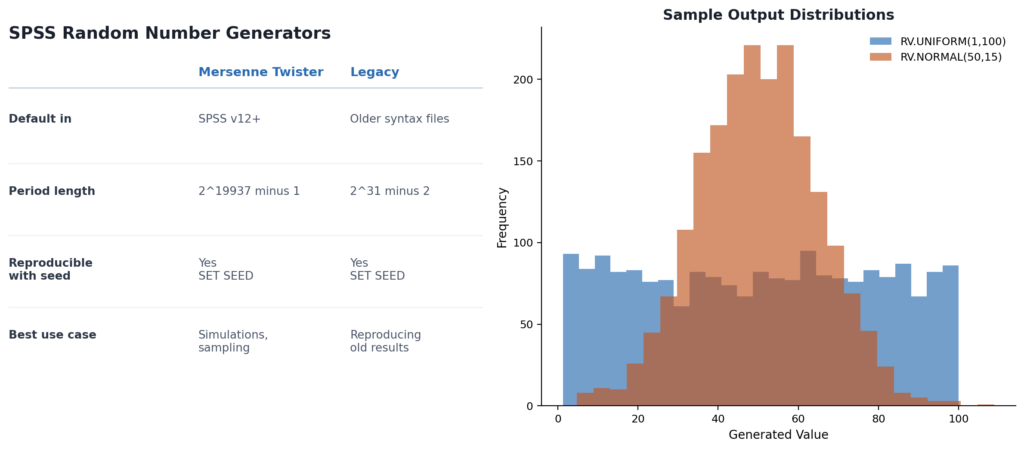
Mersenne Twister has been the default since SPSS version 12 and is, for almost every modern use case, the correct choice. It has an enormously long period before its sequence of numbers starts repeating (2^19937 minus 1), which matters for simulations and resampling procedures that draw very large numbers of values. Set it explicitly with:
SET RNG=MT SEED=123456.Legacy is the older algorithm, kept in SPSS purely for backward compatibility with syntax written before version 12. Its period is shorter (2^31 minus 2), and there’s essentially no reason to use it unless you’re specifically trying to reproduce numbers from an older study that used it. If that’s your situation:
SET RNG=LEGACY SEED=123456.One detail worth flagging explicitly: the two generators do not produce the same sequence from the same seed. If you and a collaborator (or you and your own syntax from six months ago) get different “random” results despite using an identical seed, mismatched RNG type is the first thing to check.
A Worked Example: Drawing a Random Sample for a Survey Study
Say your sampling frame is a spreadsheet of 1,500 alumni email addresses, and your target sample size, based on your power analysis, is 350. Here’s the full syntax, start to finish:
GET FILE='C:\Data\AlumniFrame.sav'.

SET RNG=MT SEED=20260101.

SAMPLE 350 FROM 1500.

SAVE OUTFILE='C:\Data\AlumniSample.sav'.
In your methods chapter, that becomes: “A random sample of 350 alumni (23.3% of the sampling frame of N = 1,500) was drawn using SPSS’s Mersenne Twister random number generator, seed 20260101.” That single sentence, backed by the syntax in your appendix, is enough for any reviewer to verify, or literally reproduce, your sample.
Common Errors (and How to Fix Them)
- “My random numbers change every time I rerun the syntax.” You didn’t set a seed. Add
SET SEED = [any number].before the random function. - Decimal values when you need whole numbers. Wrap the function in
TRUNC:COMPUTE RandInt = TRUNC(RV.UNIFORM(1,100)+1). - Duplicate participant IDs after sampling. This usually means you’re not working from a unique case identifier. Sort and check first:
SORT CASES BY id. - Results don’t match a collaborator’s output despite the same seed. Check whether you’re both using the same RNG type. Mersenne Twister and Legacy produce entirely different sequences from an identical seed.
SAMPLEselects the wrong number of cases. RememberSAMPLE n FROM Nrequires the actual total case count forN. If it doesn’t match your dataset’s real N, the proportion will be off.- Random assignment isn’t balanced. For a true 50/50 split with exact group sizes rather than a probabilistic one, use
SAMPLEon a pre-sorted, indexed dataset rather thanRV.BERNOULLI, which only guarantees the split on average, not exactly.
Writing This Up for Your Methodology Chapter
Committees don’t need a full technical explanation of pseudo-random algorithms, but they do expect four specific pieces of information whenever random number generation drives your sampling or design: the RNG type used, the seed value, the exact function and parameters, and the resulting sample size. Leaving any of these out is one of the more common, and easily avoidable, points where a methods section gets sent back with revisions. Including your full syntax as an appendix, commented with a line explaining what each block does, tends to resolve most follow-up questions before they’re even asked.
A Note on SPSS Versions
Random number generation syntax has been stable since SPSS version 12, so RV.UNIFORM, RV.NORMAL, SET SEED, and SAMPLE all work identically whether you’re running SPSS 27, 28, or 29. What can change between versions is the default RNG type on a freshly installed copy, and occasionally the exact wording SPSS uses in its dialog boxes for the Random Numbers function group. If you’re collaborating with a supervisor or a peer on a different SPSS installation, it’s worth confirming both of you are explicitly setting SET RNG=MT rather than relying on whatever the local default happens to be, an assumption that has cost more than one student an afternoon spent debugging a “mismatch” that was really just two different defaults.
Getting Help When You’d Rather Not Debug This Alone
If the syntax above is more than you want to manage on top of everything else in a dissertation, this is exactly the kind of task our analysts handle daily: seed documented, output verified against your sampling frame, syntax commented and ready to drop into your appendix. It sits alongside our broader SPSS data analysis help service, and pairs naturally with SPSS syntax help if you need a full analysis script built out rather than a single procedure.
Pricing
| Service | Typical Turnaround | Starting Price |
|---|---|---|
| Single random sampling / group randomization task | 24 to 48 hrs | $45 |
| Monte Carlo simulation setup (syntax + output + write-up) | 2 to 4 days | $120 |
| Bootstrap resampling analysis with confidence intervals | 3 to 5 days | $150 |
| Full dissertation data analysis chapter (incl. RNG procedures) | 1 to 2 weeks | $350 |
Final pricing depends on sample size, the number of procedures involved, and how much narrative write-up you need alongside the syntax itself. For a complete breakdown, see our SPSS dissertation help pricing page, or hire an SPSS expert directly for a free quote, usually returned within a few hours.
Frequently Asked Questions
No, it’s pseudo-random, produced by a deterministic algorithm seeded with a starting value. For nearly all dissertation purposes this distinction is statistically irrelevant, but it’s worth understanding and citing accurately in a methods section.
RV.UNIFORM computes new random values into a variable. SAMPLE randomly selects and retains a subset of existing cases from your dataset, and it’s the command you want for an actual probability sample.
Yes, provided you use the same seed value, the same RNG type (Mersenne Twister or Legacy), and the same version of SPSS.
If random sampling or assignment is part of your methodology, yes. Most committees expect the seed, RNG type, and function reported explicitly, and it’s good practice regardless of whether it’s asked for.
Not with a single built-in function. Wrap RV.UNIFORM in TRUNC() as shown above to convert the output to whole numbers.
Further Reading
- IBM SPSS Statistics official documentation on Compute Variable functions: the complete reference for every random distribution function SPSS supports.
- IBM’s SAMPLE command reference: full syntax and options for probability sampling.
- UCLA Institute for Digital Research and Education, “SPSS FAQ: How can I generate random numbers?”: an independent academic walkthrough that’s useful for cross-checking syntax against a second source.
About the Author
Pius Howady is a data analyst with 10 years of experience supporting graduate students with SPSS-based quantitative research, from random sampling and experimental design through full dissertation data analysis chapters.
Written and reviewed by the SPSS Dissertation Help analyst team. Last updated July 2026.